Beeline Community tags got an upgrade!
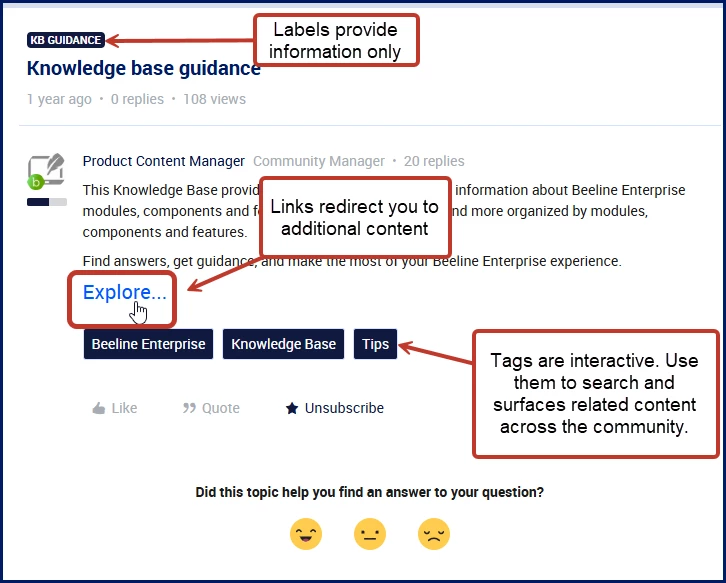
Articles and content in the Beeline Community incorporate visual clues to help you find and understand what you’re looking at. Browse through this topic to learn more.
| Item | Description |
|---|---|
| Labels | Display as a color block in the upper left corner of an article and provide information only. |
| Titles | Display in bolder font in the upper left corner of an article below any labels included on the article. They tell you what the article is about. |
| Links | May display in multiple spots in content and are hyperlinks that redirect you to additional content. |
| Tags | Display as color blocks below the main content. Tags are interactive. Use them to search and surfaces related content across the community. Selecting a tag automatically runs a search and surfaces related content across the community. It's an easy way to explore topics more quickly and discover relevant resources. |
| Likes | Show your appreciation for the content. |
| Quote | Reply to a specific post, which is especially helpful in longer threads or when clarifying a particular point. |
| Subscribe/Unsubscribe | Receive or stop notifications when someone replies or when the article or thread is updated, making it useful for tracking ongoing updates |
| Feedback emoticons | Provide quick feedback on whether the article was helpful. |