


Topics on this page
About the Sourcing Insights
Your Beeline Enterprise VMS includes embedded insights to help you and your users make efficient adept sourcing choices. As a program office user or system administrator, you can set up sourcing insights via self-service. You have full control over which insights are available as users progress through your sourcing workflows.
Persona
Clients, program office users, system administrators
How to steps
Information in this article reflects a standard Enterprise configuration. Your Enterprise platform is based on your organization’s configuration. Settings and/or data visibility rules may vary slightly from what is described.
To configure Sourcing Insights for your organization, complete these steps from your Enterprise dashboard.
Select Preferences > VMS Settings > Artificial Intelligence. An Artificial Intelligence page displays.
TIP: After you navigate to the Artificial Intelligence page, you may see features you cannot configure. Although all AI features display, what’s available to you varies based on the specific AI package to which your program subscribes.
- Under the Base section, select the Sourcing Insights link. A Sourcing Insights page displays.
- Select the Enable Sourcing Insights checkbox. A Select Feature Insights section displays.
- Optional. To designate the market rate data source you want to use, take these steps:
- From the Data Source list, select Beeline.
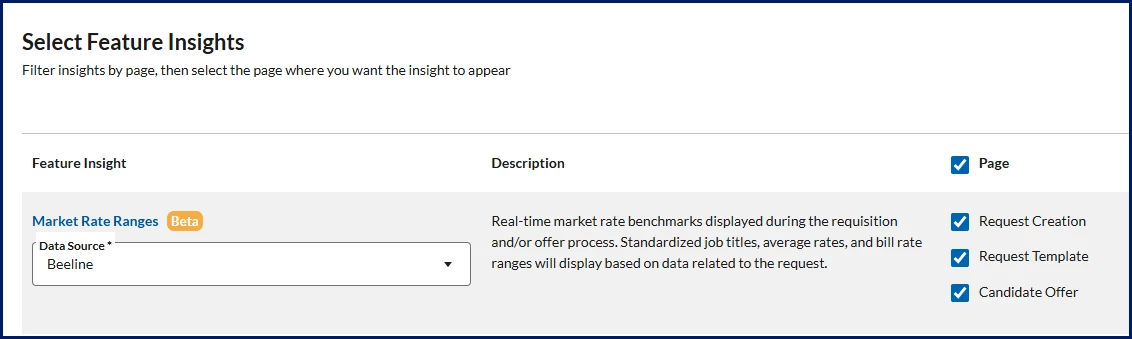
OR
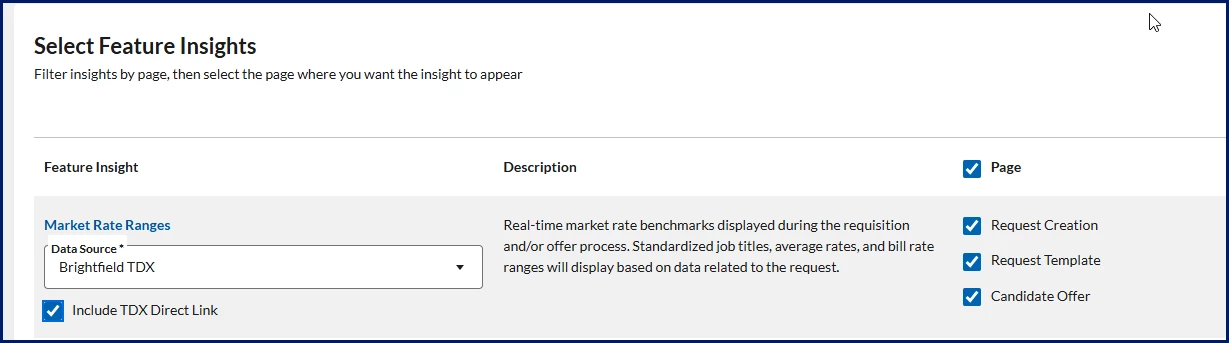
- From the Data Source list, select Brightfield TDX.
- Optional. Select Include TDX Direct Link to display a single sign-on link to users when they’re viewing rate information.
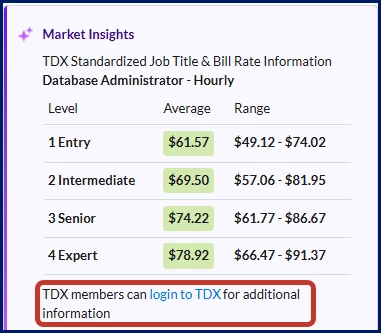
Depending on your Enterprise configuration, your market rate data source may default to Beeline. - From the Data Source list, select Beeline.
- Optional. Use the Page list to filter insights by page.
- Use the checkboxes to choose which insights you want to activate and which workflow you want to use them in. Your selections are automatically saved and applied to Enterprise.
- When you’re finished, select Return to go back to the Artificial Intelligence page.
About the Sourcing Insights
Here are lists of Sourcing Insights and the corresponding pages you can add them to.
Available Sourcing Insights by page
| Page | Insight |
|---|---|
| Request Creation |
|
| Request Template |
|
| Candidate Offer |
|
| Invite Supplier |
|
Sourcing Insights descriptions
| Insight | Description | Metric logic | Page |
|---|---|---|---|
| Market Rate Ranges | Real-time market rate benchmarks displayed during the requisition and/or offer process. Standardized job titles, average rates, and bill rate ranges display based on data related to the request. Depending on your Enterprise configuration, you may be able to choose from two data sources for your market rate data.
Market Rate Range data varies based on your data source. | Varies based on your data source |
|
| Program Rate Ranges | The minimum and maximum bill rates for active assignments for the selected job title. Shows the minimum and maximum bill rate ranges for assignments with start dates in the last six months. If the request was created earlier than six months ago, the default rate card values display. | Includes only rates that match the currency and the rate type associated with the current requisition. Rates aren’t normalized; rates across different types are excluded. |
|
| Cycle Time (Offer to Onboarding) | The average number of days from when an offer was accepted to when onboarding was completed. Shows averages for the last six months for the selected job title. | Includes only candidates submitted to a requisition for a job title that matches the current requisition. |
|
| Cycle Time (Request Released to Offer Acceptance) | The average number of days from when a request was released to when an offer was accepted. Shows averages for the last six months for the selected job title. | Includes only candidates who:
|
|
| Assignments Ending Soon | Shows the total number of active assignments and the number of assignments set to expire in the next ten days for the selected job title you have permissions to view. | Includes only active assignments with the same job title as the current requisition. Users can view only assignments they have permission to access. |
|
| Top Suppliers | Suppliers that have filled requests for the selected job title most frequently in the last six months. | Includes only suppliers who submitted candidates to requisitions with the same job title as the current requisition. |
|
| Average Hired Bill Rate | The average starting bill rate for assignments that resulted in hires with a start date in the last six months for the selected job title. | Includes only assignments where the bill rate type, job title, and currency match the current requisition’s default rate card and request type. Rates aren’t normalized; rates across different types are excluded. |
|
| Average Offer Bill Rate | The average offer bill rate extended to candidates for the selected job title in the last six months. | Include only candidates who accepted an offer and whose rate type, job title, and currency match the current requisition’s default rate card and request type. Rates aren’t normalized; rates across different types are excluded. |
|
| Submitted Rate to Request Rate | The percentage difference between the supplier’s submitted bill rate and the client’s request rate for requests created in the last six months for the selected job title. | Include only candidates submitted by the same supplier as the current one, where the rate, rate type, job title, and currency match the current requisition’s default rate card and request type. Rates aren’t normalized; rates across different types are excluded. |
|
| Offer Rejected Average Rate | The average offer bill rate declined by candidates for requests created in the last six months for the selected job title in the last six months. | Include only candidates from the same supplier who rejected an offer with the same rates, rate type, job title, and currency as the current offer. Rates aren’t normalized; rates across different types are excluded. |
|
| Offer Rate Negotiation | The average percentage difference the final bill rate is lower or higher than the supplier’s originally submitted rate. Shows averages for requests created in the last six months for the selected job title. | Include only candidates from the same supplier who accepted an offer with the same rates, rate type, job title, and currency as the current offer. Rates aren’t normalized; rates across different types are excluded. |
|
| Average Submitted Rate | The average bill rate submitted by the supplier for requests created in the last six months for the selected job title. | Includes only candidates submitted by the same supplier as the current candidate where the submitted rate, rate type, job title, and currency match the default rate card and the request type for the current requisition. Rates aren’t normalized; rates across different types are excluded. |
|
| Active Projects by Supplier | The number of active projects associated with the selected supplier. | Include only active projects assigned to the selected supplier. |
|
| Projects Completed on Time | The percentage of projects completed on time for the selected supplier, based on project close surveys. | Include only projects assigned to the selected supplier with Project Close Survey feedback that projects were promptly completed. |
|
| Projects Completed on Budget | The percentage of projects completed on budget for the selected supplier, based on project close surveys. | Include only projects assigned to the selected supplier with Project Close Survey feedback that projects were completed within the projected spend. |
|
| No Bids by Supplier | The percentage of projects the selected supplier chooses not to participate in. | Include only bids assigned to the selected supplier where the bid status is Not Interested. |
|
| Persona | Modules | Documentation release | Feedback? Email us: |
|---|---|---|---|
| Clients, program office users, system administrators | Contingent Staffing | Beeline Enterprise | Q3 2025 | beelinecommunity@beeline.com |