


Faster candidate evaluation with role‑relevant, AI‑driven clarity
AI‑Powered Resume Insights helps hiring teams quickly understand candidate fit by transforming resumes into concise, scannable insights aligned to the job’s requirements. Instead of manually reviewing lengthy documents, users can instantly surface relevant experience, skills, and qualifications—while still retaining access to the full resume when deeper review is needed.
By analyzing both the candidate’s resume and the associated job context, Resume Insights delivers a more focused, data‑driven view that supports faster, more consistent hiring decisions across high candidate volumes.
How it helps
-
Review faster: See a concise, structured summary of each candidate’s skills, experience, and qualifications—no need to scan the full resume first.
-
Compare consistently: Each resume is analyzed against the same job context for uniform, fair review.
-
Stay in control: Use insights to shortlist with confidence, then open the full resume for deeper review.
How it works
Resume Insights quickly turns resume content into clear, role‑aligned insights so you can evaluate candidates faster and with more confidence. Resume content is analyzed against the job title and description. Along with experience, education, certifications, projects, and skills when included in your job description. No external data is used.
The AI then surfaces four focused bullet points that highlight:
- Relevant skills and qualifications
- Experience that aligns with the role
- Notable achievements
- Potential risk areas (like gaps or limited experience)
These insights give you an at‑a‑glance view of strengths and gaps while still letting you open the full resume for deeper review. The tool supports your decision‑making, but it does not make hiring decisions or recommendations—your judgment is always the final call.
Action required
AI‑Powered Resume Insights is a standard AI feature automatically available in Contingent Staffing. Your system administrator just needs to set it up. See this article for more information.
To learn more about AI packages and features, contact your Relationship Manager.
Persona
Hiring managers and program office users
How to steps
Insights support your decisions—they don’t replace them. You stay in the driver’s seat while getting the clarity you need.
Pro tip: Resume Insights are generated only for new candidates submitted after the feature is turned on in Beeline Enterprise.
Prerequisites
- Because insights are based on the candidate’s resume along with the job title and description, the candidate must have a resume associated with their profile.
Information in this article reflects a standard Enterprise configuration. Your Enterprise platform is based on your organization’s configuration. Settings and/or data visibility rules may vary slightly from what is described.
Leveraging Resume Insights quick start
You can leverage Resume Insights from the Candidates app in the Hiring Manager Experience and from Candidate Evaluation.
- Open the candidate you want to review and select the Resume tab.
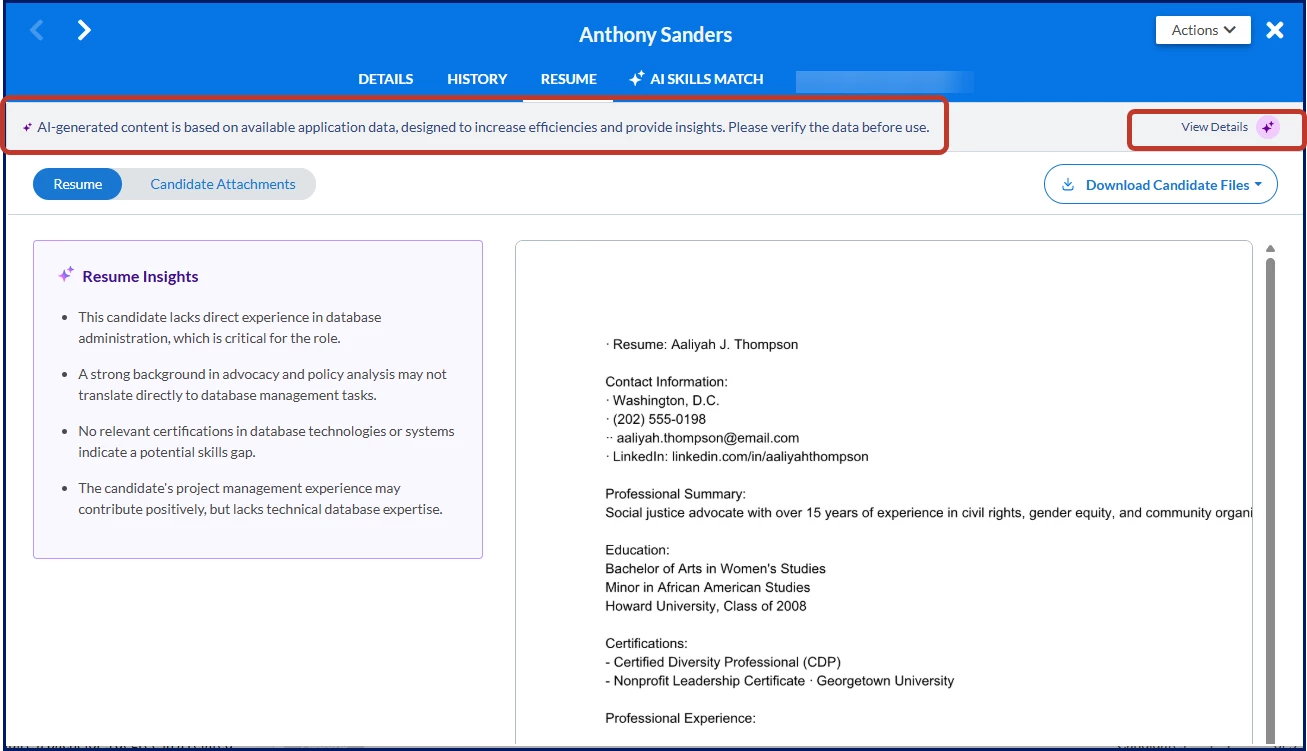
- Orient yourself: Resume Insights displays on the left side and the full resume displays on the right side.
- Review the insights to assess alignment with your open request, such as skills, qualifications, experience, achievements, potential gaps.
- Optional. Select Candidate Attachments to view additional documents.
- Optional. Select Download Candidate Files to export candidate documents to your device.
- Take the appropriate next action in the Candidates app or in Candidate Evaluation, like advance, shortlist, or decline.
Examining AI components
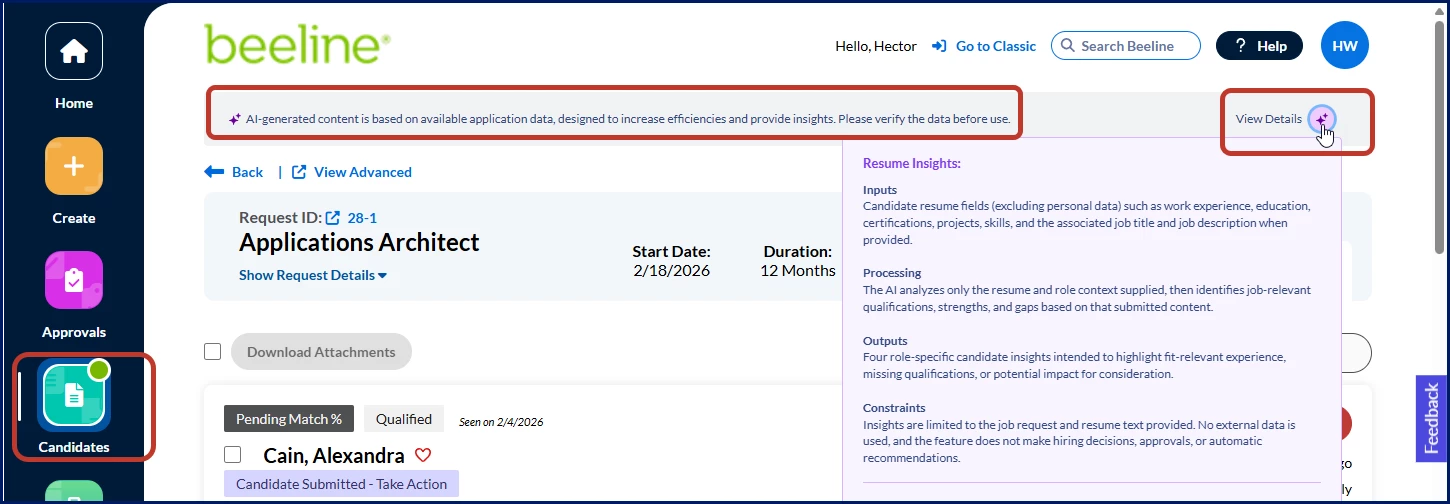
When at least one AI feature is set up in Enterprise, a message displays at the top of the app or page. Review the message and optionally hover over the View Details icon to learn more about how the AI-generated content is created.
Leveraging Resume Insights—Hiring Manager Experience
To accomplish your task, complete these steps from your Hiring Manager Experience.
- From the left Navigation, select the Candidates app.
- Select the open request you want to review.

- Navigate to the candidate you want to evaluate, and select the Resume tab.

- Resume Insights display in a separate section on the left with the candidate’s resume in a section at the right.

- Use the Resume Insights to support your evaluation of a candidate and to quickly assess their alignment with your open request.
- Review and scroll down through the full resume for deeper context.
- Optional. Select Candidate Attachments to view additional documents uploaded to the candidate’s profile.
- Optional. Select Download Candidate Files to export documents uploaded to the candidate’s profile to your local device.
- After your review, take action using the available features in the Candidates app.
Leveraging Resume Insights—Candidate Evaluation
You can launch Candidate Evaluation using one of these options in Beeline Classic:
- My To Do > You received # new resumes link
- Request dashboard > Request menu > Evaluate Candidates
- Request dashboard > Candidates section → Action menu > Evaluate Candidates
- Request > Tabbed view → Evaluate Candidates link
To use Candidate Evaluation to appraise and act on candidates submitted to a request, follow these steps from your Enterprise dashboard.
This example explains navigating from your My To Do dashboard.
- From My To Do, select the You received # new resumes link.

The Candidate Management Tool displays.
- Navigate to the candidate you want, and then select Evaluate Candidates.

The Candidate Evaluation feature displays.
- Locate and select the Candidate Name link for the candidate you want to evaluate.

The Candidate dialog displays.

- To view Resume Insights, select the Resume tab.

- Resume Insights display in a separate section on the left with the candidate’s resume in a section at the right.

- Use the Resume Insights to support your evaluation of a candidate and to quickly assess their alignment with your open request.
- Review and scroll down through the full resume for deeper context.
- Optional. Select Candidate Attachments to view additional documents uploaded to the candidate’s profile.
- Optional. Select Download Candidate Files to export documents uploaded to the candidate’s profile to your local device.
- After your review, take action using the available features in Candidate Evaluation.
| Persona | Modules | Documentation release | Feedback? Email us: |
|---|---|---|---|
| Clients, program office users, system administrators | Contingent Staffing Intelligence & Automation | Beeline Enterprise | Q1 2026 | beelinecommunity@beeline.com |