


Hiring Manager Experience: Search
This content reflects standard Beeline Enterprise functionality which may vary from what you see when logged into Beeline Enterprise depending on any client-specific settings or adjustments.
Navigate to the Hiring Manager Experience Home tab.
Located in the upper right section of the screen is the Search Beeline feature. This global search feature is accessible on all major screens throughout the Hiring Manager Experience.
Search Beeline
-
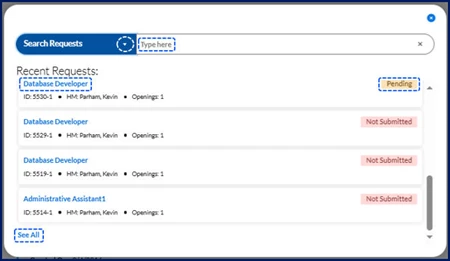
Click in the Search field located at the top right side of the screen. A dialog displays your search results.
-
Use the down arrow in the Search field to select a different search option or enter text in the Type here field to refine your current search.
-
Use the scroll bar to navigate to the bottom of the list and then click the See All link to be redirected to the My Data App to view your full list of results.
-
Click either the hyperlink on the left or the status displayed on the right to drill down to the Details screen for any item in the list.
-
Request and Assignment records are visible to both the Hiring Manager as well as the Hiring Manager’s manager, making these items actionable by either manager.
-
Search options include:
| Option | Sample search result record |
|---|---|
| Assignments |  |
| Candidates |  |
| Competitive Bids* |  |
| Expenses |  |
| Master Hierarchy |  |
| Milestones* |  |
| Projects* |  |
| Reports |  |
| Requests |  |
| SOWs* |  |
| Timesheets |  |
*Only visible to a client with an active Services Procurement account.
| Persona | Module | Date Posted | Feedback? Email us: |
| Hiring Manager | HMX | Beeline Enterprise | Dec 2025 |