


Accurate, simple tax rate calculations.
Taxes can be complicated and challenging to manage. But accurate tax rates are essential for generating precise invoices through Beeline Enterprise. So why not use Enterprise’s integration with Zip2tax™ to regularly update and maintain your United States (US) sales tax rates?
Using Enterprise’s integration with Zip2tax eliminates manually managing and updating your US sales tax data.
TIP: Zip2tax is a market-leading tax service. Visit their website to learn more.
Main benefits
-
Empower your supplier to correctly identify the taxability of an engagement or a milestone.
-
Automate capturing and maintaining sales tax rates.
-
Eliminate manual intervention and decision-making from your sales tax calculations.
-
Ensure you’re aligned with local market rates and/or your own custom rate standards.
-
Provides a tax audit trail.
Action required
Enterprise’s Zip2tax integration is available at no additional cost for contingent staffing assignments with work locations in the United States. Using Enterprise’s Zip2tax integration requires:
- Your program team and an Enterprise team.
- A Make a Change ticket and discussions with your Client Operations Manager (COM).
- Analysis and potential updates to your tax job categories, work locations, and tax/nontaxable allocation of assignments.
- Enterprise configuration and workflow adjustments.
- UAT and change management with your suppliers prior to integrating Zip2tax in your production environment.
Learn about Enterprise sales tax calculations
Sales tax rates on invoices are calculated in Enterprise using a Tax Job Category and a Tax Definition.
When you implement Enterprise, your program's Tax Job Categories and Tax Definitions are set up based on the data you provide. After that, you must manually track changes to sales tax rates and have them updated in Enterprise via a Service Request ticket.
| Term | Description |
|---|---|
| Tax Job Category |
|
| Tax Definition |
|
Understand the advantage
The Tax Job Categories and the Tax Definitions set up for your program don’t change when you use Enterprise’s Zip2tax integration. But the sales tax rate data in your US Tax Job Categories does change.
Here’s how your sales tax rate data changes.
- It comes from an external source, Zip2tax.
- It’s automatically downloaded daily from Zip2tax and stored in Enterprise ensuring that your sales tax rate calculations are refreshed and accurate.
Caution: Once a Tax Job Category is configured to use Enterprise’s Zip2tax integration to automate US sales tax rates, you cannot use that same Tax Job Category to manually track rates.
Discover the sales tax calculation differences
| Without Zip2tax integration | With Zip2tax integration | |
|---|---|---|
| Fields used to calculate US sales tax rates |
When a tax exists for the country, state, county, and/or city of the assignment work location, the applied tax is a sum of those amounts. |
Because the Zip2tax integration relies on the work location zip code, that data must be correct to produce accurate sales tax calculations. Work with your COM to ensure your work location zip codes are accurate. |
| Job Tax Category | Defaults on a requisition or statement of work (SOW) based on your Request Type and Project Type settings. The tax job category a candidate is associated with cannot be changed.
| Defaults on a requisition or statement of work (SOW) based on your Request Type and Project Type settings. Persists through your candidate submission workflows to your candidate offer workflow. But can be changed by the supplier approving an offer. |
Learn how suppliers designate tax job categories
Your suppliers know whether the services and candidates they provide are taxable or nontaxable. So, you can rely on them to designate whether a US engagement is taxable or nontaxable.
The taxable or nontaxable designation chosen by your supplier, the job tax category and the work location zip code drive the sales tax rate automatically applied to invoiced transactions associated with an assignment.
During your candidate offer workflow
When a supplier submits a billable or nonbillable candidate to a requisition, the tax job category used for tax calculations defaults based on the Request Type and Project Type settings. But with Enterprise’s Zip2tax integration, your supplier can select a different tax job category when they accept an offer.
TIP: Available tax job categories are determined by the request type.
Your supplier must also confirm that the offer is correctly categorized as taxable or nontaxable.
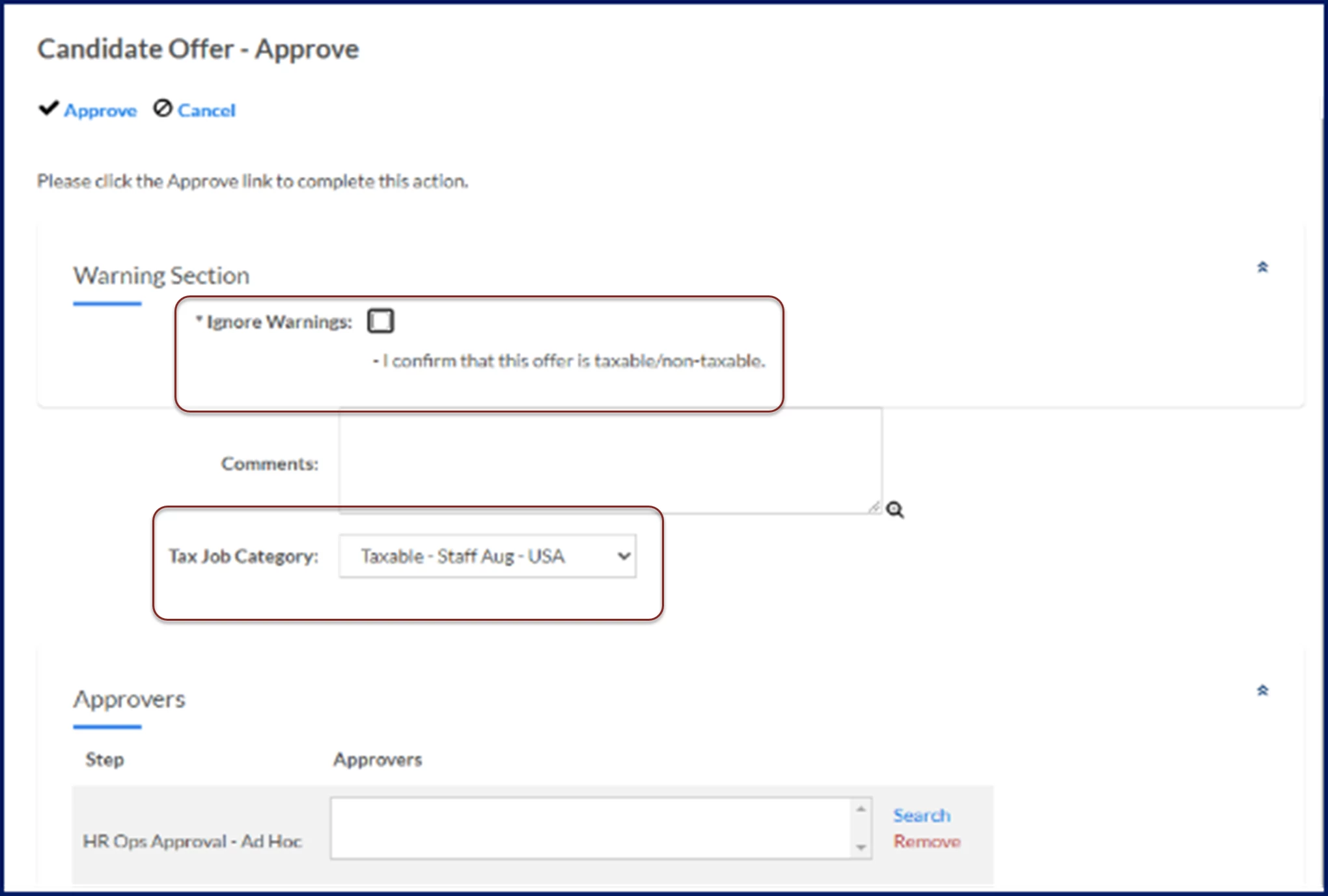
TIP: You can make the Tax Job Category a mandatory field during the Candidate Offer workflow based on your Enterprise configuration.
While submitting a milestone payment
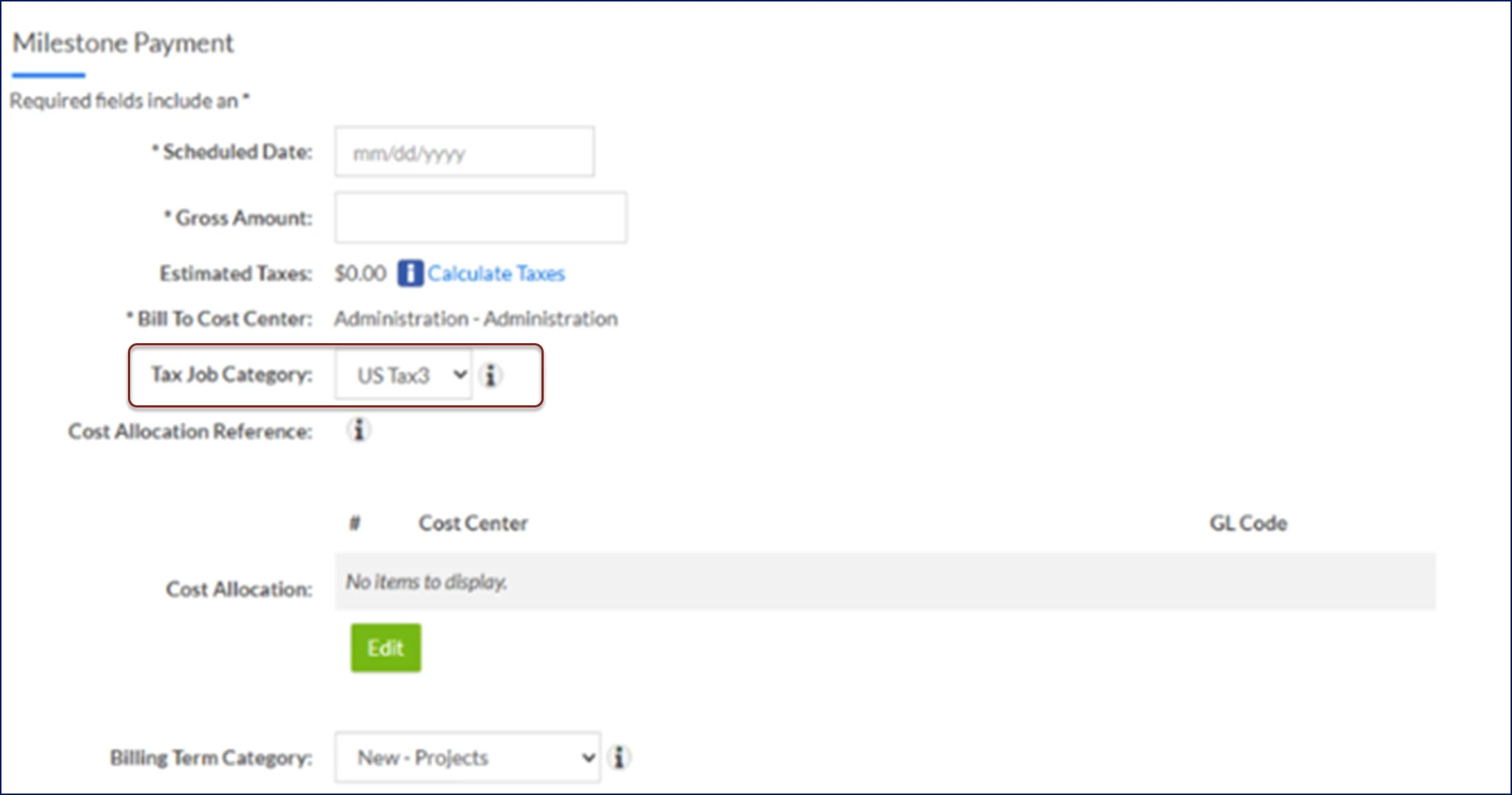
When a supplier submits a milestone payment, the tax job category used for tax calculations defaults based on the Project Type settings. But with Enterprise’s Zip2tax integration, your supplier can select a different tax job category when they submit a milestone for payment.
Documentation release: Beeline Enterprise | Q2 2025