


Understand how Time & Expense settings control data entry, pay codes, and expense types
Time & Expense Administration provides the configuration framework used to manage time and expense entry. These settings determine which fields users see, which fields are required, which default values are applied, and how lookups behave during timesheet and expense submission.
Time & Expense Administration includes configuration areas for Pay Codes, Expense Types, Expense Configuration, Timesheet Configuration, reprocessing tools, and Company Setup. Together, these components help standardize how time and expense information is entered and managed.
Use this article as a reference guide to the primary configuration components used throughout Time & Expense Administration.
Why it matters
- Controls the information users must provide during time and expense entry.
- Helps enforce organization-specific requirements.
- Supports consistent use of Pay Codes and Expense Types.
- Establishes configuration standards used throughout Time & Expense Administration.
Who it's for
- Program Office users
- System Administrators
How it helps
- Understand Time & Expense configuration components.
- Identify where Pay Codes and Expense Types are managed.
- Learn how field visibility, requirements, and defaults are configured.
- Prepare for Time & Expense administration activities.
How it works
Time & Expense Administration uses a configurable framework to control how information is presented during timesheet and expense entry. Configuration settings determine which fields are available, required, prepopulated, and searchable.
Time and expense components
| Component | Purpose |
|---|---|
| Expense Configuration | Controls field visibility, requirements, defaults, and search behavior for expense entry. |
| Expense Types | Define the categories of expenses users can submit. |
| Timesheet Configuration | Controls field visibility, requirements, defaults, and search behavior for time entry. |
| Pay Codes | Define the categories of payable time that users can enter. |
| Reprocess Expenses | Supports correction of expense transactions. |
| Reprocess Timesheets | Supports correction of timesheet transactions. |
| Company Setup | Defines organization-wide Time & Expense settings. |
Configuration controls
Expense Configuration and Timesheet Configuration use the same field-management model.
| Configuration control | Purpose |
|---|---|
| Show | Determines whether a field is visible. |
| Required | Determines whether a field must be completed. |
| Default Value | Automatically populates a predefined value. |
| Type Ahead | Controls how users search for and locate values. |
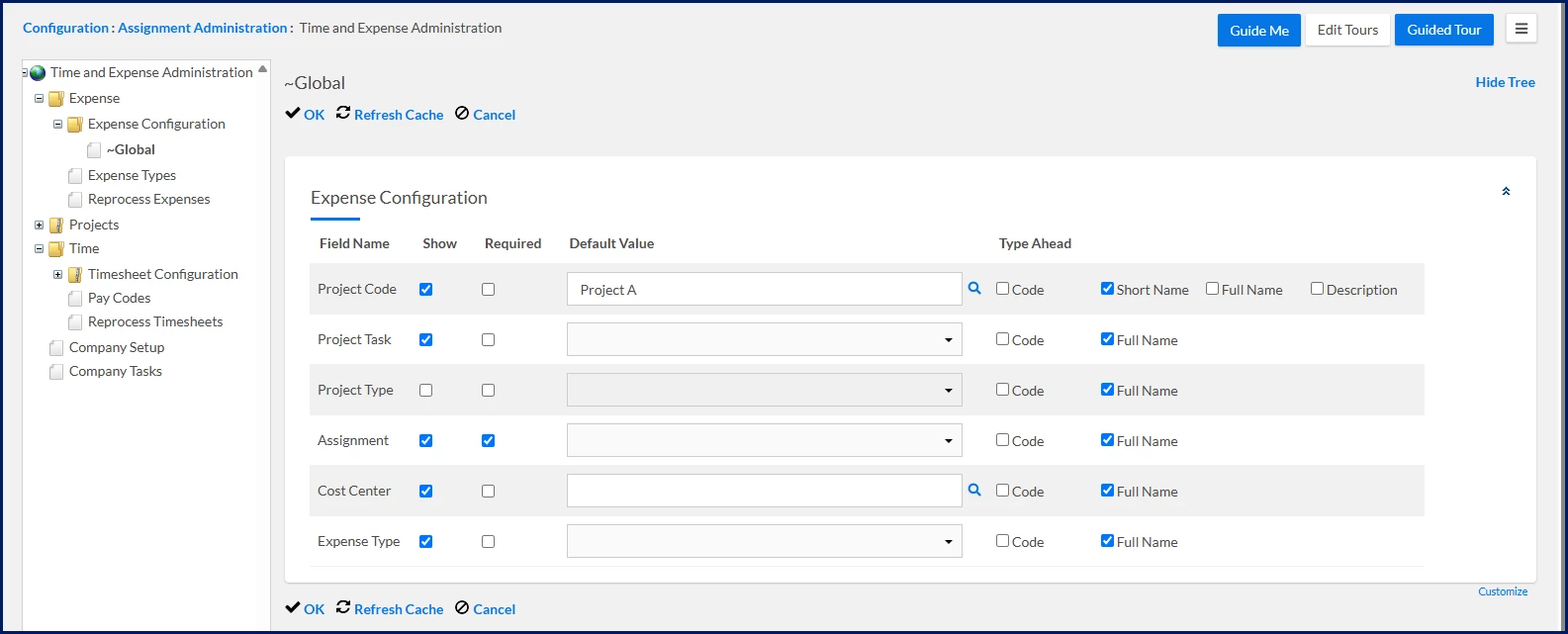
Expense configuration fields
| Field | Available controls |
|---|---|
| Project Code | Show, Required, Default Value, Type Ahead |
| Project Task | Show, Required, Default Value, Type Ahead |
| Project Type | Show, Required, Default Value, Type Ahead |
| Assignment | Show, Required, Default Value |
| Cost Center | Show, Required, Default Value, Type Ahead |
| Expense Type | Show, Required, Default Value |
Expense Configuration allows administrators to control visibility, requirements, default values, and search behavior for expense-entry fields.
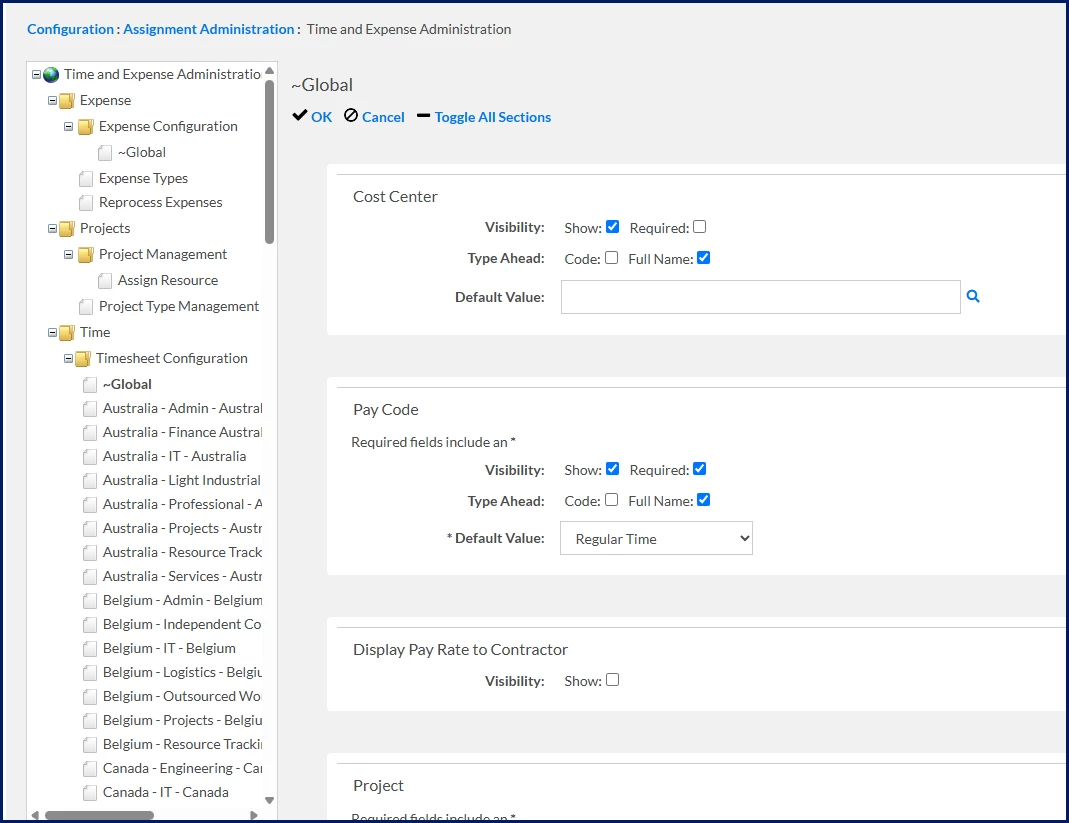
Timesheet configuration fields
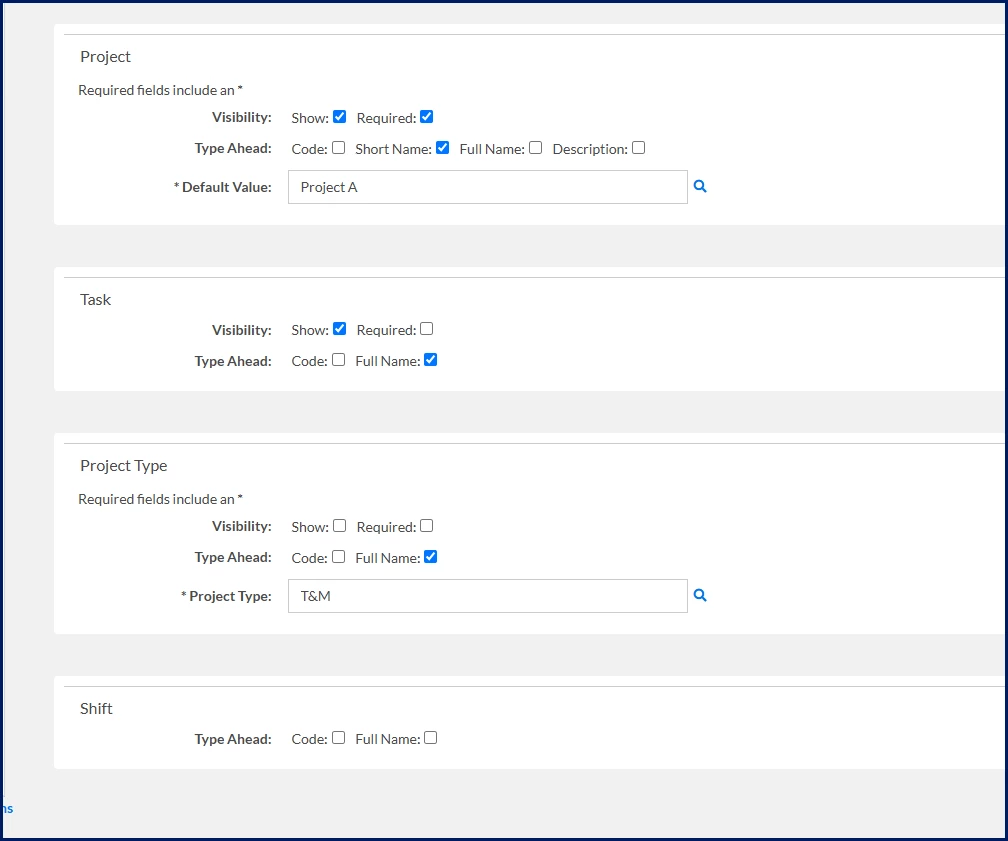
Timesheet Configuration allows administrators to control visibility, requirements, default values, and search behavior for timesheet-entry fields.
| Field | Available controls |
|---|---|
| Cost Center | Show, Required, Default Value, Type Ahead |
| Pay Code | Show, Required, Default Value, Type Ahead |
| Project | Show, Required, Default Value, Type Ahead |
| Task | Show, Required, Type Ahead |
| Project Type | Show, Required, Default Value, Type Ahead |
| Shift | Type Ahead |
Pay Codes
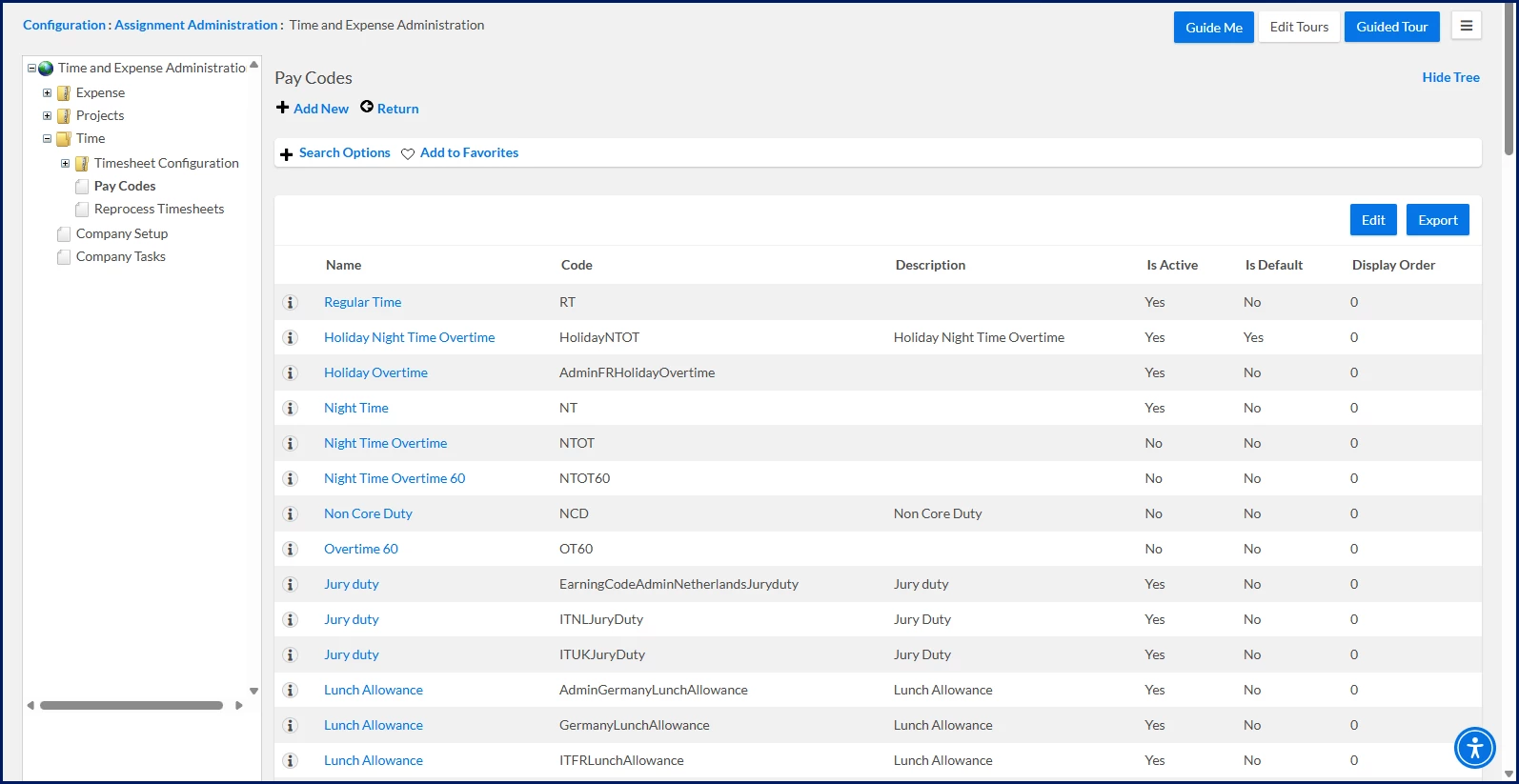
The Pay Code administration area displays configured Pay Codes and their associated settings.
| Pay Code element | Purpose |
|---|---|
| Name | Identifies the Pay Code. |
| Code | Stores the Pay Code identifier. |
| Description | Documents the Pay Code. |
| Active | Determines whether the Pay Code is available. |
| Is Default | Identifies the default Pay Code. |
| Display Order | Controls display sequence. |
Expense Types
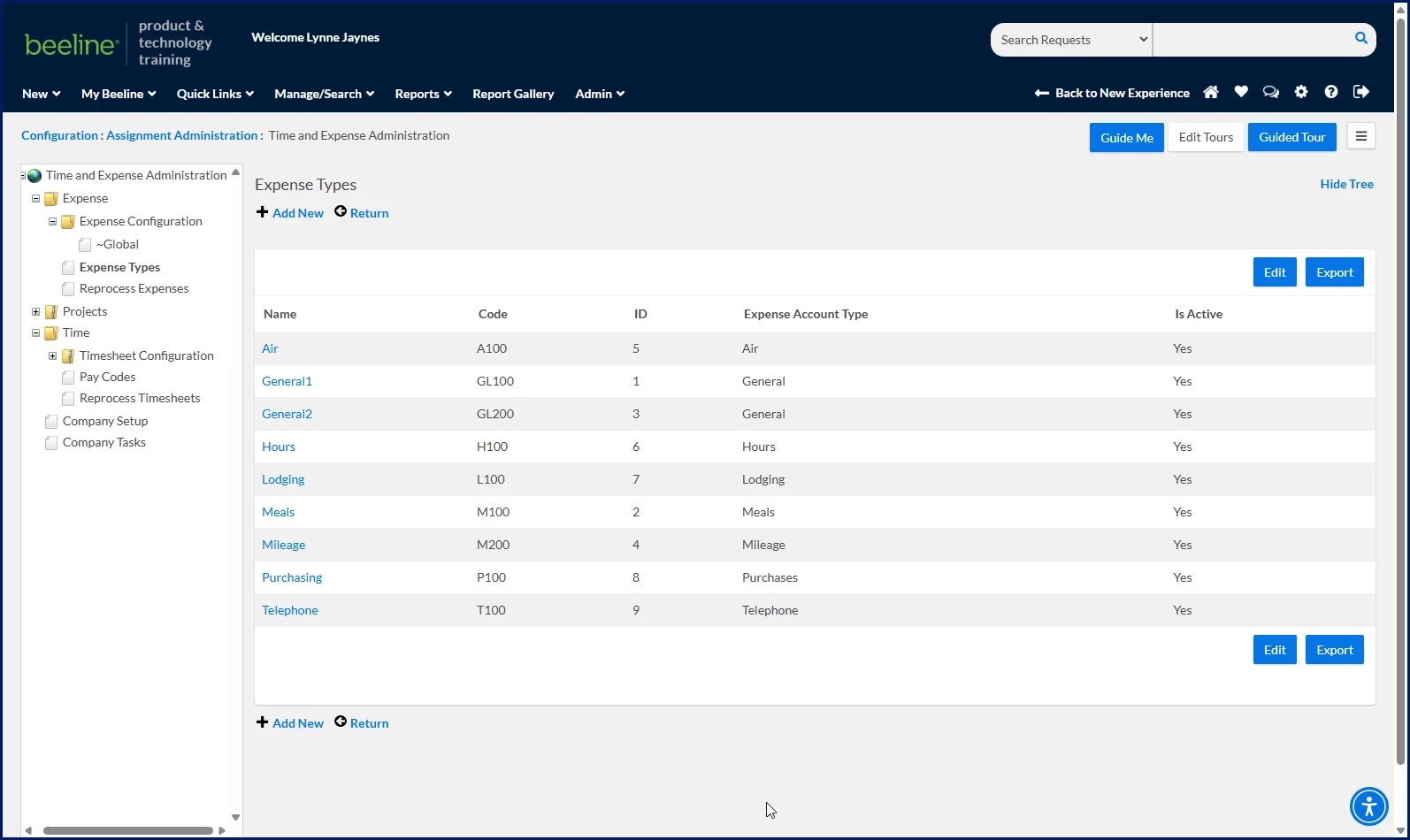
The Expense Types administration area displays configured Expense Types and their associated settings.
| Expense Type element | Purpose |
|---|---|
| Name | Identifies the Expense Type. |
| Code | Stores the Expense Type identifier. |
| ID | Stores the internal identifier. |
| Expense Account Type | Classifies the Expense Type. |
| Is Active | Determines whether the Expense Type is available. |
Important behavior
| Consideration | Impact |
|---|---|
| Fields can be configured as visible or hidden. | Users only see fields enabled for entry. |
| Fields can be configured as required or optional. | Required fields must be completed before submission. |
| Default values can be configured. | Frequently used values can be populated automatically. |
| Type Ahead behavior can be configured. | Search and lookup experiences vary by field. |
| Pay Codes and Expense Types determine available selections. | Pay Codes and Expense Types control the values available for selection during time and expense entry. |
Additional considerations
- Use consistent naming conventions for Pay Codes and Expense Types.
- Review existing values before creating new ones.
- Consider reporting requirements when creating classifications.
- Validate configuration changes before broad implementation.
- Periodically review inactive and unused values.
Availability and setup
Manage Time & Expense settings through Admin > Time & Expense Administration.
Learn more
Related articles:
- Reprocess a timesheet
- Reprocess an expense record
| Persona Program office users | Modules Administration | Documentation release Beeline Enterprise | Q3 2026 | Feedback? Email us: |