


The background check provider update process synchronizes the status and results of background check orders between Beeline Enterprise and your Accurate® integration. Updates are sent from your Accurate integration to Enterprise.
Information in this article reflects a standard Enterprise configuration. Your Enterprise platform is based on your organization’s configuration. Settings and/or data visibility rules may vary slightly from what is described.
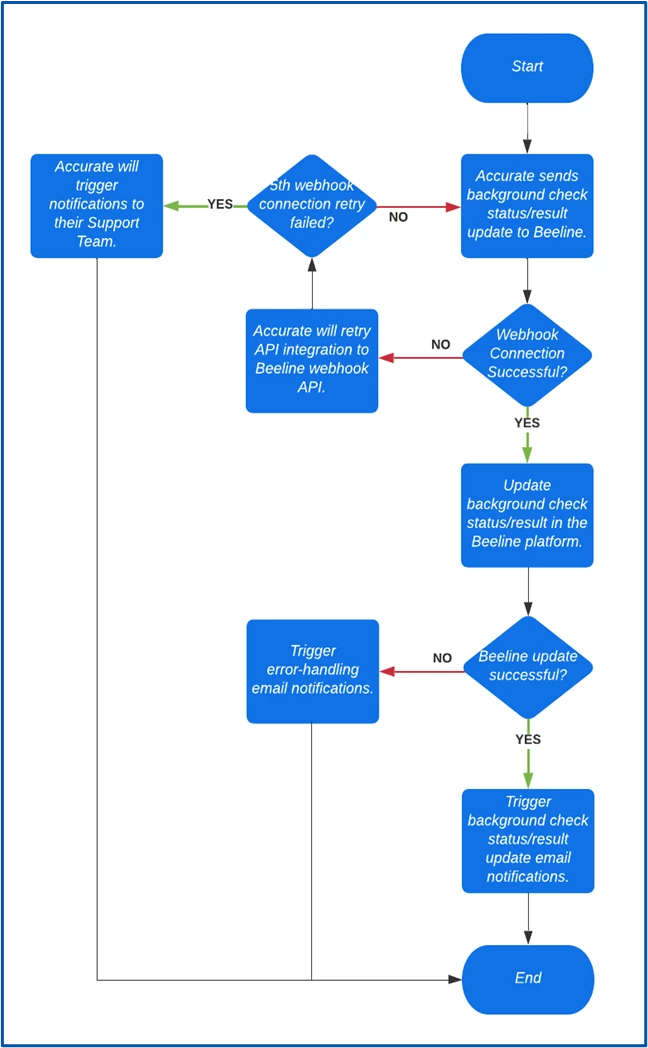
Provider update errors
This topic outlines integration errors that might occur while updates to the status and results for a background check order are sent from Accurate to your Beeline platform. Recommended actions and remediation steps are included.
Resource ID Not Found
Beeline was unable to find the resource ID in the background check order update received from Accurate.
Error message
Candidate Resource ID (xxxxxxxx-xxxx-xxxx-xxxx-xxxxxxxxxxxx) does not match with the Resource ID Reference Code (xxxxxxxx-xxxx-xxxx-xxxx-xxxxxxxxxxxx) in the Payload Data.
Recommended action
Contact your Beeline representative and/or create a support ticket.
Remediation steps
-
Navigate to Beeline’s website.
-
From the Navigation ribbon, select Support.
-
From the Customer service and support page, select Request Assistance under Beeline Support.
-
Select the type of assistance you need.
-
Include the Beeline Background Checks–Accurate Integration in the description of your support ticket.
Missing Required Properties in the Background Check Order Update Payload
Beeline was unable to process the background check order update received from Accurate because data was missing in required properties in the expected JSON payload.
Error message
The background check update payload contains the following error(s): Order Status is required, Order Result is required,
Order ID is required,
Event Info is required.
Recommended action
Contact your Beeline representative and/or create a support ticket.
Remediation steps
-
Navigate to Beeline’s website.
-
From the Navigation ribbon, select Support.
-
From the Customer service and support page, select Request Assistance under Beeline Support.
-
Select the type of assistance you need.
-
Include the Beeline Background Checks–Accurate Integration in the description of your support ticket.
Malformed API JSON Response
Beeline was unable to process the background check order update received from Accurate. The update payload either contains an invalid property or isn’t in the correct JSON format.
Error message
Error in Deserializing Accurate Response.
Recommended action
Contact your Beeline representative and/or create a support ticket.
Remediation steps
-
Navigate to Beeline’s website.
-
From the Navigation ribbon, select Support.
-
From the Customer service and support page, select Request Assistance under Beeline Support.
-
Select the type of assistance you need.
-
Include the Beeline Background Checks–Accurate Integration in the description of your support ticket.
Background Check Order ID Not Found
Beeline was unable to find the Order ID in the background check order update received from Accurate.
Error message
Unable to retrieve Candidate Provider Background Check Record.
Recommended action
Contact your Beeline representative and/or create a support ticket.
Remediation steps
-
Navigate to Beeline’s website.
-
From the Navigation ribbon, select Support.
-
From the Customer service and support page, select Request Assistance under Beeline Support.
-
Select the type of assistance you need.
-
Include the Beeline Background Checks–Accurate Integration in the description of your support ticket.
Initial documentation release: Beeline Q2 2022