


Give suppliers control over AI—while keeping your workflows consistent and compliant
The AI Disclaimer & Processing Opt‑Out setting puts control in your users’ hands. Provide suppliers with clear visibility into AI processing and the ability to opt out at the candidate level. All while keeping workflows smooth and ensuring AI features behave consistently across your organization.
Jump to what you want
Why it matters
- Supports responsible AI adoption without forcing participation
- Helps meet compliance, security, and governance requirements
- Builds trust with suppliers through transparency and control
- Ensures consistent AI behavior across all workflows
- Reduces risk by automatically excluding opted-out candidates
Who it's for
- Program office users
- Suppliers
How it helps
- Gives suppliers clear visibility into AI processing during submission
- Lets users opt out individual candidates without blocking platform participation
- Enforces opt-out decisions automatically across current and future AI workflows
- Displays clear messaging when AI insights are unavailable
- Delivers a durable, consistent control model for AI governance
How it works
| What happens | Benefit |
|---|---|
| Program office enables AI disclaimer and processing opt-out settings | Turn on tenant-level control |
| Supplier submits a candidate | Standard workflow continues |
| Supplier sees AI processing disclosure | Improves transparency |
| Supplier selects opt-out for a candidate (optional) | Applies candidate-level control |
| The selection flags the candidate as opted out | Creates a system-level constraint |
| The candidate is automatically excluded from AI workflows, such as Interview Question Generator, Resource Matching Intelligence, Resume Insights, and Skills Proximity | Ensures consistent enforcement |
| Messaging appears where AI insights are unavailable | Keeps users informed |
Availability and setup
AI Disclaimer and Processing Opt-Out settings are automatically available to Program office users from VMS Settings. After the feature is configured, suppliers can easily exclude an individual candidate from AI processing at submission.
How to steps
Information in this article reflects a standard Enterprise configuration. Your Enterprise platform is based on your organization’s configuration. Settings and/or data visibility rules may vary slightly from what is described.
To accomplish your task, complete these steps from your Enterprise dashboard.
- Select Preferences > VMS Settings > Artificial Intelligence. An Artificial Intelligence page displays.
- Select AI Disclaimer & Processing Opt-Out. An AI Disclaimer & Processing Opt-Out page displays.
- Select AI Disclaimer & Processing Opt-Out.
- Select Save to apply the configuration.
User experience
AI processing opt-out gives you control over how AI is used across your tenant while allowing suppliers to make informed, candidate-level decisions. The result is consistent AI behavior, reduced risk, and a transparent experience that builds trust without disrupting workflows.
What suppliers experience
| Step | What the user experiences | Benefit |
|---|---|---|
| Start candidate submission | Open the standard candidate submission page | No change to existing workflow |
| Review AI notice | See a banner explaining that candidate data may be used in AI-powered features | Understand how AI will be used before submitting |
| Confirm consent | Confirm the candidate has been informed and permissions are obtained | Support compliance and transparency |
| Choose opt-out (optional) | Select the AI processing opt-out checkbox for the candidate | Apply control at the individual candidate level |
| Submit candidate | Complete submission as usual | No disruption to the workflow |
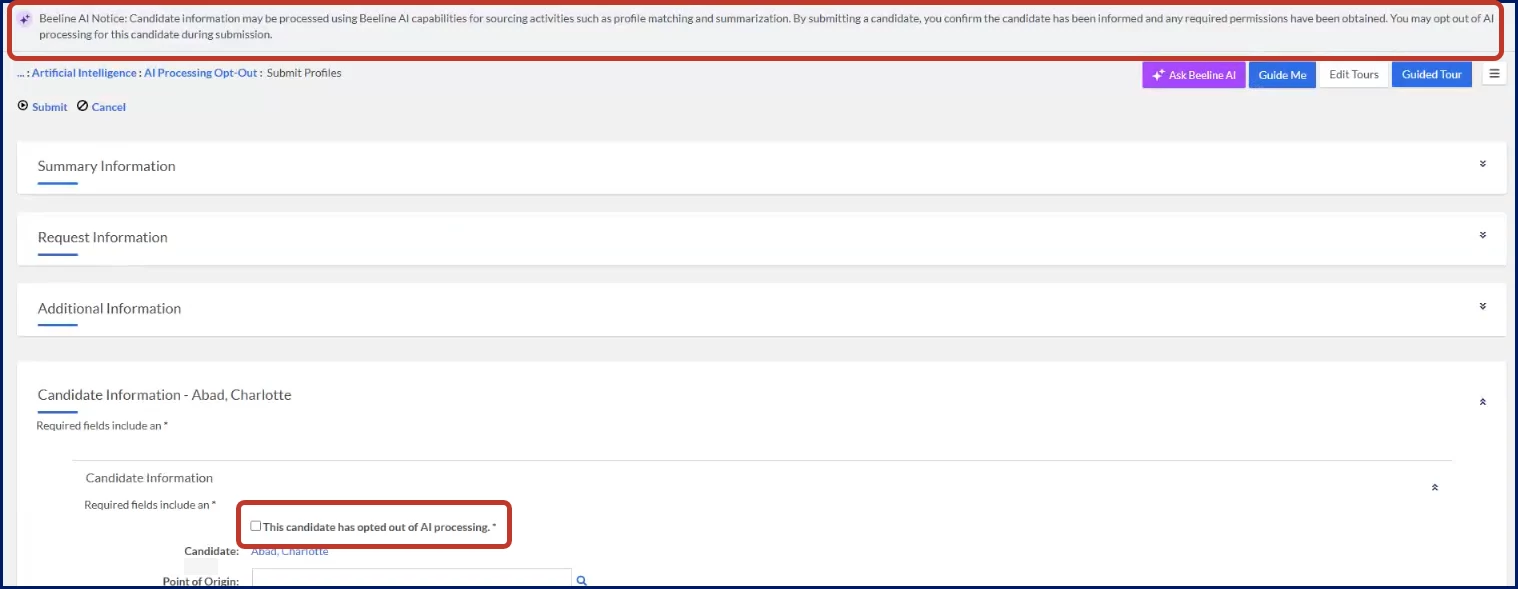
What happens after submission
- The candidate is flagged as opted out of AI processing when selected.
- The opt-out is applied as a global AI eligibility rule across applicable workflows.
- AI workflows automatically exclude the candidate from processing.
- AI-generated insights (such as summaries or matching results) don’t display.
- Users see clear in-app messaging explaining why AI insights are unavailable.
What AI features are affected
When a supplier selects AI Disclaimer & Processing Opt‑Out for a candidate, the candidate is automatically excluded from AI-powered functionality, including:
- Resume Insights
- Skills Proximity
- Interview Question Generator
- Resource Matching Intelligence
As a result, AI-generated insights, recommendations, matching results, and question generation associated with these features are unavailable for opted-out candidates. The platform displays appropriate messaging so users understand why AI-generated results are not shown.
What other users experience
| User | What they see | Why it matters |
|---|---|---|
| Hiring managers | Missing AI insights with explanatory messaging | Understand why data is unavailable without assuming an error |
| Program office users | Consistent behavior across all workflows | Maintain trust and predictability |
| Admins | Enforced behavior based on configuration | No manual intervention required |
| Persona Clients, program office users | Modules Artificial Intelligence Cross-platform
| Documentation release Beeline Enterprise | Q2 2026 | Feedback? Email us: |