


Provide timely assignment feedback and help support informed workforce decisions
Assignment Assessment Questionnaires (AAQs) help organizations collect assignment-specific feedback from stakeholders such as Hiring Managers, Project Managers, Supplier Managers, and Timesheet Approvers.
When you receive a questionnaire, you can review assignment details, complete the questionnaire, save your progress, and submit your responses for review.
Questionnaires are created and assigned by administrators based on assignment milestones and business rules. After you submit your responses, the questionnaire is routed to the designated reviewer for evaluation.
Jump to what you want
Why it matters
- Provide feedback on assignment performance and outcomes.
- Support assignment continuation and extension decisions.
- Verify completed activities and requirements.
- Share assignment-specific observations and recommendations.
- Contribute to documented workforce and assignment reviews.
Who it's for
- Hiring Managers
- Project Managers
- Supplier Managers
- Timesheet Approvers
How it helps
- Submit assignment-specific feedback.
- Complete questionnaires across multiple sessions.
- Include comments and supporting information.
- Ensure feedback reaches the designated reviewer.
Understand questionnaire status
| Status | Description |
|---|---|
| Not yet started | The questionnaire has not been opened or saved. |
| In Progress | The questionnaire has been started and saved as a draft. |
| Completed | The questionnaire has been submitted. |
Before you begin
To complete a questionnaire, ensure you:
- Have received a questionnaire notification.
- Are listed as a questionnaire recipient.
- Have the information needed to answer the questionnaire questions.
How to steps
Information in this article reflects a standard Enterprise configuration. Your Enterprise platform is based on your organization’s configuration. Settings and/or data visibility rules may vary slightly from what is described.
To accomplish your task, complete these steps from your Enterprise dashboard
Completing a questionnaire
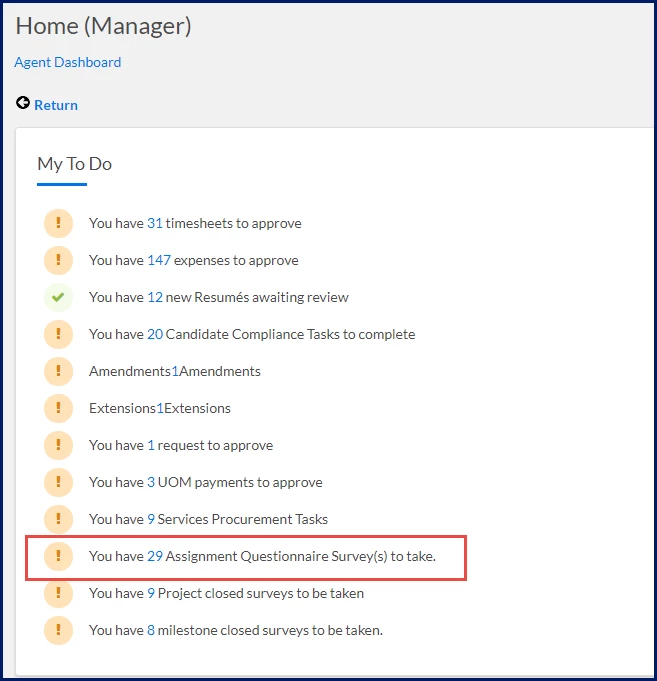
- From the My To Do section, select Assignment Questionnaire Survey(s) to take. An Assignment Questionnaire Respondent Report window displays.
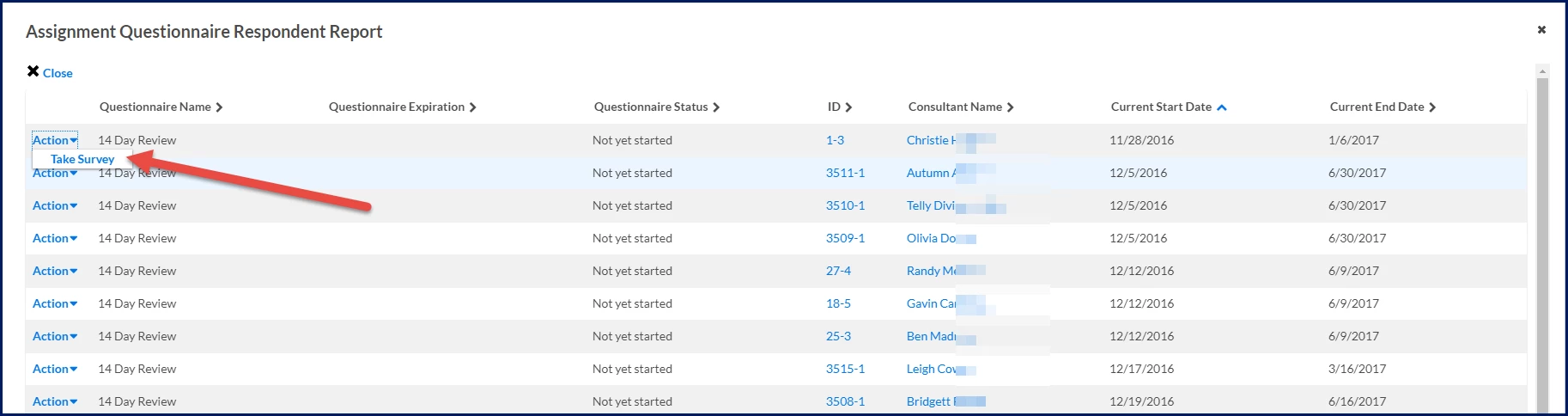
- Review the questionnaires assigned to you. The questionnaire list displays information such as:
Column Description Questionnaire Name The questionnaire assigned to you. Questionnaire Expiration The questionnaire due date. Questionnaire Status Indicates whether the questionnaire has been started. Consultant Name The worker associated with the questionnaire. Current Start Date Assignment start date. Current End Date Assignment end date. - From the Action menu, select Take Survey. A Survey Taker page displays.
- Review the assignment information displayed at the top of the questionnaire. Assignment details may include:
- Hiring Manager
- Assignment ID
- Job Class
- Consultant Name
- Assignment Dates
- Timesheet Approver
- Work Location
- Cost Center
- Answer each question presented in the questionnaire. Some questionnaires contain multiple pages. Use Next and Previous to move between pages while completing the questionnaire.
Questionnaires may contain different question types, including:Question type Description Multiple Choice Select one or more predefined answers. Single Choice Select one answer from a list of options. Drop-down Select an answer from a drop-down list. Yes/No Select Yes or No. True/False Select True or False. Text Box Enter a short, written response. Essay Enter a detailed written response. - Optional. Add comments. If comments are allowed, enter additional information or context.
- Optional. Add attachments. If attachments are required, you must upload the requested documentation before you can submit the questionnaire.
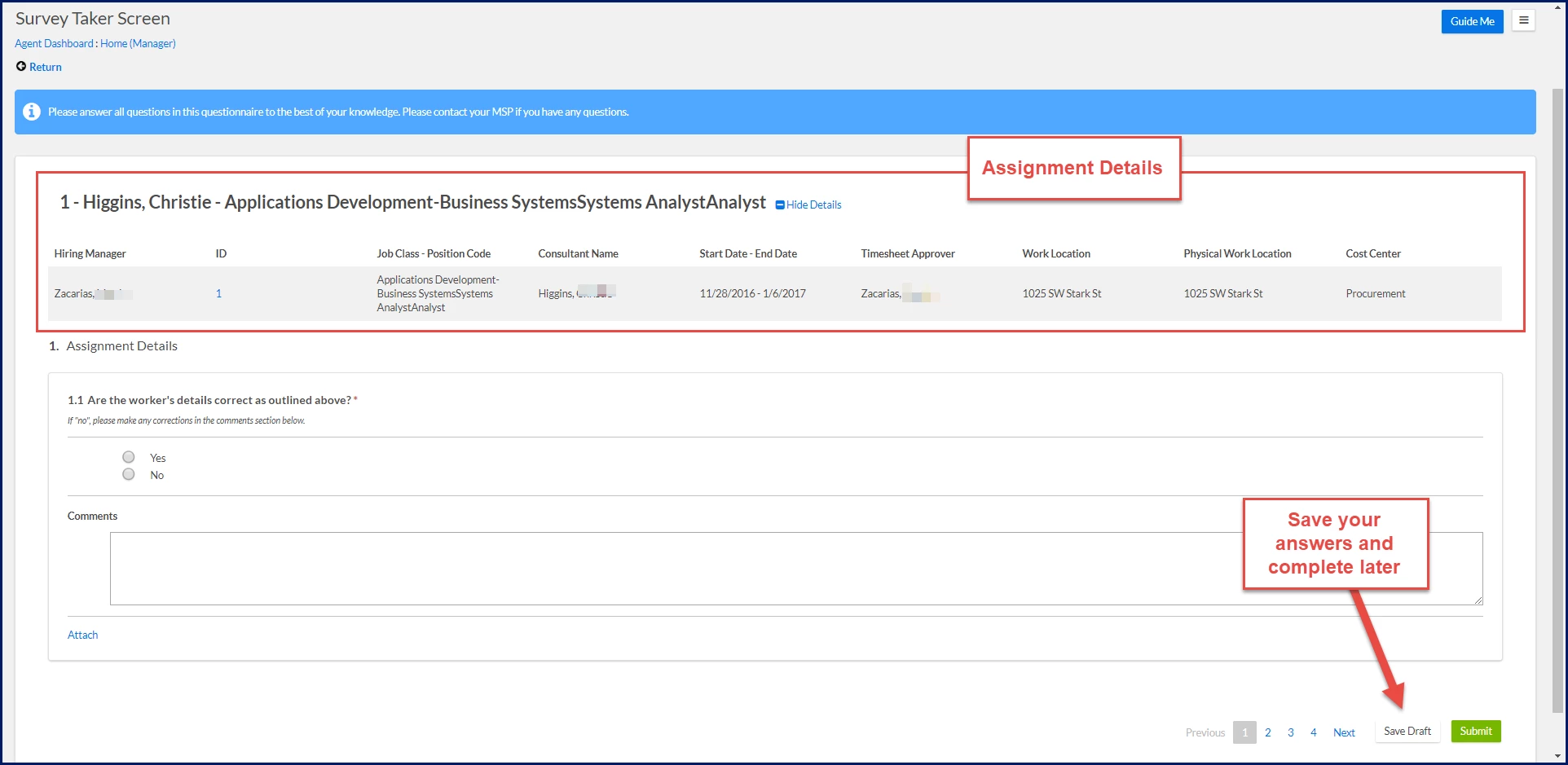
- Select Save Draft if you want to save your progress and complete the questionnaire later. Your responses are saved and remain available until you return to complete the questionnaire or the questionnaire expires.
- Verify all required questions have been completed. Required questions must be answered before the questionnaire can be submitted.
Important: If the questionnaire includes an expiration date, submit your responses before the questionnaire expires. After expiration, the questionnaire is no longer available for completion or submission.
- Select Submit. Your questionnaire is submitted and routed to the designated reviewer for evaluation.
What happens next?
After you submit the questionnaire:
- Your responses are routed to the designated reviewer.
- Reviewers can evaluate your responses, comments, attachments, and questionnaire results.
- Questionnaire results may be used to support assignment reviews, extension decisions, compliance activities, and workforce decisions.
Related tasks
Depending on your role, you may also want to:
- Configure Assignment Assessment Questionnaires to create and manage questionnaire templates.
- Review Assignment Assessment Questionnaire responses to evaluate submitted questionnaire results.
Frequently asked questions
Can recipients save a questionnaire and complete it later?
Yes. Recipients can save their progress and return later to complete the questionnaire, provided the questionnaire has not expired.
What happens if a questionnaire expires?
After a questionnaire expires, recipients can no longer complete or submit it. If a questionnaire expires without a response, the designated reviewer is notified.
Why can't I submit a questionnaire?
Verify that:
- All required questions are completed.
- Required attachments have been uploaded.
- The questionnaire has not expired.
Why am I not receiving a questionnaire?
Verify that:
- You are assigned as a questionnaire recipient.
- The assignment meets the template criteria.
- The questionnaire has not expired.
- The questionnaire is active.
What questionnaire notifications will I receive?
As a questionnaire recipient, you may receive:
- A notification when a questionnaire is available to complete.
- Reminder notifications before a questionnaire expires.
| Persona Hiring Managers, Project Managers, Supplier Managers, Timesheet Approvers
| Modules Contingent Staffing | Documentation release Beeline Enterprise | Q2 2026 | Feedback? Email us: |