Review completed assignment assessments and make informed assignment decisions
Assignment Assessment Questionnaire (AAQ) reviewers evaluate completed questionnaire responses submitted by assignment stakeholders. Use questionnaire results to assess assignment performance, support assignment continuation decisions, verify completed activities, and identify assignments that may require additional attention.
Assignment Assessment Questionnaires are created by administrators and completed by designated recipients before becoming available for review. As a reviewer, you can access assigned questionnaires, review submitted responses, and use the results to support assignment and workforce decisions.
Why it matters
Gain visibility into assignment feedback and outcomes.
Identify assignments that may require follow-up.
Support assignment continuation and extension decisions.
Verify that required activities have been completed.
Review questionnaire results in a consistent format.
Maintain a documented record of assignment assessments.
Who it's for
Client administrators who review completed questionnaires.
MSP and VMO users responsible for assignment oversight.
Program office users who evaluate assignment performance.
Designated questionnaire reviewers.
How it helps
Centralizes questionnaires awaiting review.
Highlights completed assessments that require attention.
Provides access to questionnaire scores, responses, comments, and attachments.
Helps identify passed and failed assessments.
Supports informed workforce and assignment decisions.
Understanding the AAQ process
Assignment Assessment Questionnaires move through the following lifecycle:
An administrator creates and activates a questionnaire template.
A recipient receives and completes the questionnaire.
A reviewer evaluates the submitted responses and results.
Before you begin
To review questionnaire responses, ensure you:
Are designated as the reviewer on the questionnaire template.
Have access to Assignment Assessment Questionnaires.
Have completed questionnaires available for review.
Reviewer access
Only designated reviewers can access detailed questionnaire responses.
Users with reporting access may be able to view questionnaire reporting data and summary results, but detailed questionnaire responses, comments, attachments, and scoring information are limited to the assigned reviewer.
If you are not assigned as a reviewer, questionnaires do not appear in your review queue.
How to steps
Information in this article reflects a standard Enterprise configuration. Your Enterprise platform is based on your organization’s configuration. Settings and/or data visibility rules may vary slightly from what is described.
To accomplish your task, complete these steps from your Enterprise dashboard
Reviewing questionnaire responses
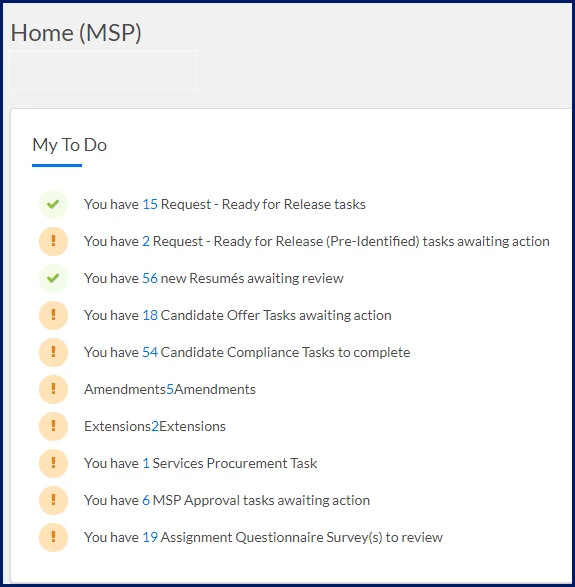
Review completed Assignment Assessment Questionnaire (AAQ) responses to evaluate assignment feedback, support assignment decisions, and identify follow-up actions. When a questionnaire is submitted, a dashboard notification displays the number of questionnaires assigned to you for review.
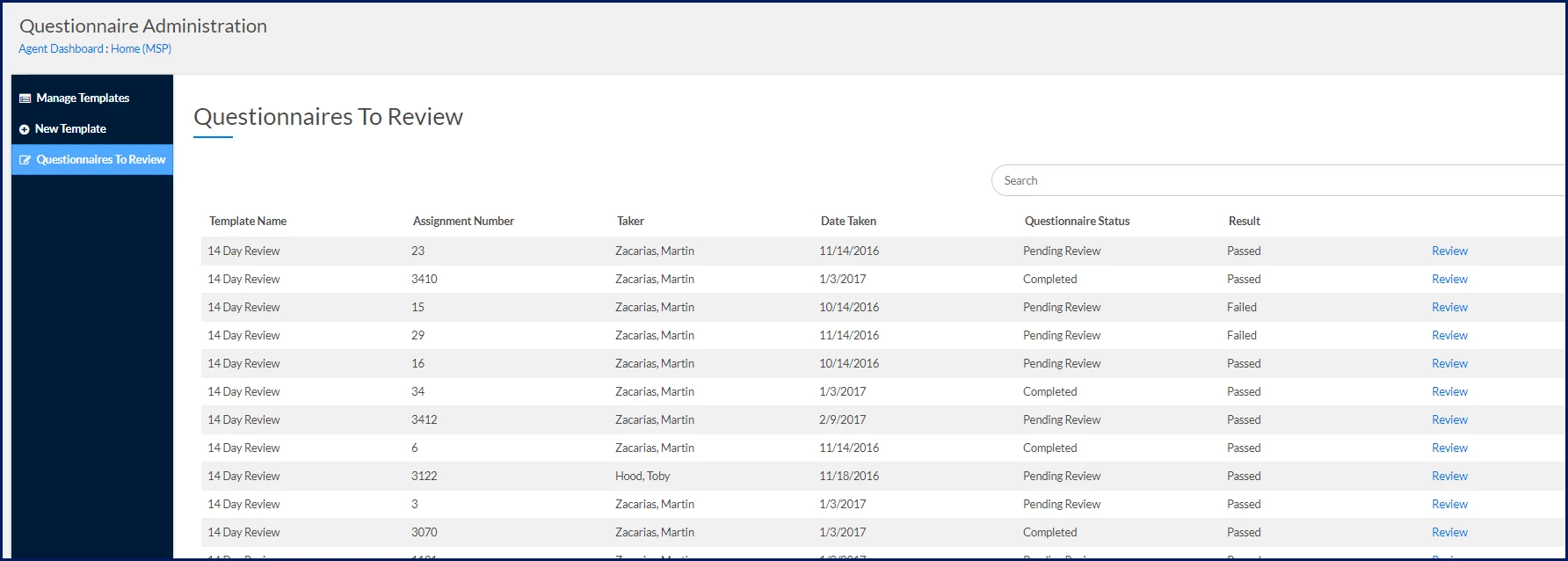
From the My To Do section, select Assignment Questionnaire Survey(s) to review. A Questionnaires To Review page displays. Only questionnaires assigned to you as the reviewer appear in your review queue.
TIP: Users who are not assigned as reviewers do not see questionnaires in their review queue.
Review the questionnaires assigned to you. The review queue includes:
Column
Description
Template Name
The questionnaire template used to generate the questionnaire.
Assignment Number
The assignment associated with the questionnaire.
Taker
The user who completed the questionnaire.
Date Taken
The date the questionnaire was submitted.
Questionnaire Status
The current review status.
Result
The questionnaire outcome.
Review
Opens the completed questionnaire for review
Select Review for the questionnaire you want to evaluate. A completed questionnaire displays, including submitted responses, comments, scores, and any attachments provided by the questionnaire recipient.
Review available information, such as:
Responses
Comments
Attachments
Scores
Questionnaire results
Review the questionnaire status to understand where each questionnaire is in the review process and help prioritize your review activities.
Status
Description
Pending Review
The questionnaire has been completed and is waiting for reviewer action.
Review In Progress
The review has started but is not yet complete.
Completed
The review has been completed.
Review the questionnaire result to identify assessments that may require additional review or follow-up.
Result
Description
Passed
Responses met the configured scoring requirements and did not trigger a knockout condition.
Failed
Responses did not meet the configured scoring requirements or triggered a knockout condition.
Use questionnaire responses, scores, comments, and attachments to:
Evaluate assignment performance.
Support assignment continuation and extension decisions.
Verify completed activities.
Identify assignments that may require additional attention.
Document stakeholder feedback and review outcomes.
Related tasks
Depending on your role, you may also want to:
Configure Assignment Assessment Questionnaires to create and manage questionnaire templates.
When you create a questionnaire template, you designate a reviewer who is responsible for evaluating submitted responses. For detailed instructions, see Assignment Assessment Questionnaire: Reviewing responses.
Can anyone view completed questionnaire responses?
No. Only designated reviewers can access detailed questionnaire responses, comments, attachments, and scoring information. Users with reporting access may be able to view summary questionnaire information through reports, but detailed questionnaire access is limited to the assigned reviewer.
Why isn't a questionnaire appearing in the review queue?
Questionnaires appear only for the reviewer designated on the questionnaire template. If you are not assigned as the reviewer, the questionnaire does not appear in your review queue.
What questionnaire notifications will I receive?
As a reviewer, you may receive:
A notification when a completed questionnaire is available for review.
A notification when a questionnaire expires without a response.
What does Failed mean?
A questionnaire may receive a Failed result if the score does not meet the configured passing score or if a knockout response is selected.
Please complete the following fields as part of your Beeline Community registration. Unless noted as private, this information will be displayed on your user profile within the community.