


Topics on this page
Thoroughly investigating a Candidate before making a decision to go forward with a joint project helps your teams make a well-informed hiring decision. Your company undoubtedly already recognizes the value of a vetting process. You’re probably using multiple criteria stored in your internal systems to verify the suitability of engaging a new Candidate or reengaging previous Talent.
You need a way to streamline your candidate eligibility process, integrate your eligibility criteria, ensure data sensitivity, and quickly identify Candidates who require additional vetting before onboarding. Beeline’s Candidate Eligibility solution integrates your Beeline platform with your internal systems so you can promptly and properly vet Candidates before onboarding using a single solution—your Beeline Extended Workforce Platform.
Main benefits
- Expedite Talent onboarding and streamline Candidate eligibility vetting.
- Equip your program team and your hiring personnel with information revealed through vetting that can help them tailor their interviews.
- Exclude unsuitable Candidates and makes recruiting effective because approximately 50% of submitted Candidates can be discarded. Your team can focus on only interviewing the cream of the crop.
- Leverage a single source solution for tracking and determining candidate eligibility—your Beeline platform.
- Eliminate unnecessary manual research of ineligible Candidates.
- Reduce potential duplicate Candidate records.
Action required
Integrating the Candidate Eligibility solution requires a Make a Change ticket and Beeline platform configuration. Contact your Beeline Representative to learn more about the Candidate Eligibility integration and how you can include it as part of your program.
Prerequisites
Your organization must develop and configure an API endpoint. Your API endpoint will receive requests from Beeline with Candidate-related data and send replies to Beeline. The data exchange synchronizes a Candidate's eligibility status, reasons for that status, the effective date or that status, their former employee data, and/or former contractor data.
Information in this article reflects a standard Enterprise configuration. Your Enterprise platform is based on your organization’s configuration. Settings and/or data visibility rules may vary slightly from what is described.
About the components
Your company may have multiple eligibility criteria stored in your internal databases that you check to verify the suitability of engaging a new Candidate or reengaging previous Talent. With Beeline’s Candidate Eligibility integration, you can streamline your Candidate eligibility process, integrate your eligibility criteria, ensure data sensitivity, and quickly identify Candidates who require additional vetting before onboarding.
Beeline’s Candidate Eligibility solution is comprised of these components:
- Your API endpoint
- Candidate Eligibility integration endpoint
- Do Not Rehire/Reengage (DNR) feature
Supported integrations
Your Candidate Eligibility integration can initiate events at any one of these procurement stages:
- Candidate Submit
- Candidate Offer
- Candidate Onboarding
About the DNR feature
Your Program team can use client-defined fields in your Beeline platform to flag Talent as a Former Contractor and/or a Former Employee. In addition, they can add Do Not Rehire/Reengage (DNR) options on a Talent’s record. DNR options include a Warning or an Alert. Your Program team determines those settings based on data in your internal databases.
These events can be initiated using the Candidate Eligibility integration based on your program’s preference, your chosen workflow, a Candidate's previously engaged status, and a Candidate's DNR eligibility status and the status reason.
| DNR Option | Description |
|---|---|
| Warning | Allow Suppliers to submit Candidates with a Warning but displays a message in the Beeline platform based on the configured workflow. Your Program team manually decides whether to disqualify the Talent or proceed with additional vetting. |
| Alert | Automatically blocks Candidate submission, disqualifies a Candidate and stops further procurement progresses. Automatically notifies the Supplier at submission the Candidate is not eligible and instructs them to contact their Beeline representative with questions. |
About your API endpoint
Central to Beeline's Candidate Eligibility integration is an external application programming interface (API) developed by your team. Your organization must develop and configure an API endpoint.
Your API endpoint must comply with Beeline’s specifications outline in this technical overview. Your API endpoint will receive requests from Beeline with Candidate-related data and send replies to Beeline. The data exchange synchronizes a Candidate's eligibility status, reasons for that status, the effective date or that status, their former employee data, and/or former contractor data.
About the Candidate Eligibility integration endpoint
Beeline's Candidate Eligibility integration endpoint sends a call to your API to pull updates about a Candidate's DNR status, their eligibility status and the eligibility reasons from your enterprise systems. Beeline’s integration endpoint call can be triggered and automatically verify a Candidate's eligibility for reengagement prior to onboarding based on your chosen workflow.
Your Candidate Eligibility integration lets you control how subsequent workflows progress and how Candidates are processed through your Beeline platform based on the status updates.
For example, you can choose these configuration options:
- Automatically approve Candidates.
- Automatically reject ineligible (Do Not Reengage) Candidates.
- Automatically trigger additional approvals to further vet a Candidate with an Alert status in a Do Not Reengage flag.
Authentication requirements
Adhering to standards and enforcing security are key business considerations for you and for Beeline. Your Candidate Eligibility integration uses OAuth (open-standard authorization) 2.0, which meets Internet Engineering Task Force (IETF) authentication and authorization standards.
Note: The IETF is a world-recognized open standards organization.
OAuth 2.0 protocol with client credentials using Auth0Ò is required. The OAuth 2.0 framework is an industry-standard for authorizing designated secure access. Auth0 provides a robust authentication framework.
Data point exchange requirements
To synchronize Candidate eligibility data in your databases with the Beeline server, your API endpoint must receive and send these data points.
| Field | Format | Required | Description |
|---|---|---|---|
| Authorization URL | string | yes | URL for fetching the security token |
| Endpoint URL | string | yes | URL to which the Beeline request payload is sent |
| Header parameters | multiline string | no | Represent the meta-data associated with the API request and response. The parameters specify the variable parts of your resources: the data you’re working with. Data format is a JavaScript Object Notation (JSON) dictionary that denotes how you represent data in text/string form in the call to the authorization URL and/or the endpoint/request URL. Here's an example.
|
About the payloads & media types
APIs have proven to be some of the best tools and protocols for permitting interaction, communication, and sharing of data between various applications and web services. Various apps and systems share data and information regularly over the internet.
Each unit of transmitted data possesses two essential parts: the header/overhead identifier and the actual information—called the payload. Developers/Programmers use the term payload to differentiate between the essential information in a chunk of data and the information used to support it.
A payload in API is the actual data pack (the body) sent with the GET method in HTTP. The payload carries the real message an app or system needs to initiate action.
The overhead/ header data is an identifier that indicates the source and destination of the transmitted information. It’s removed after the message reaches its destination.
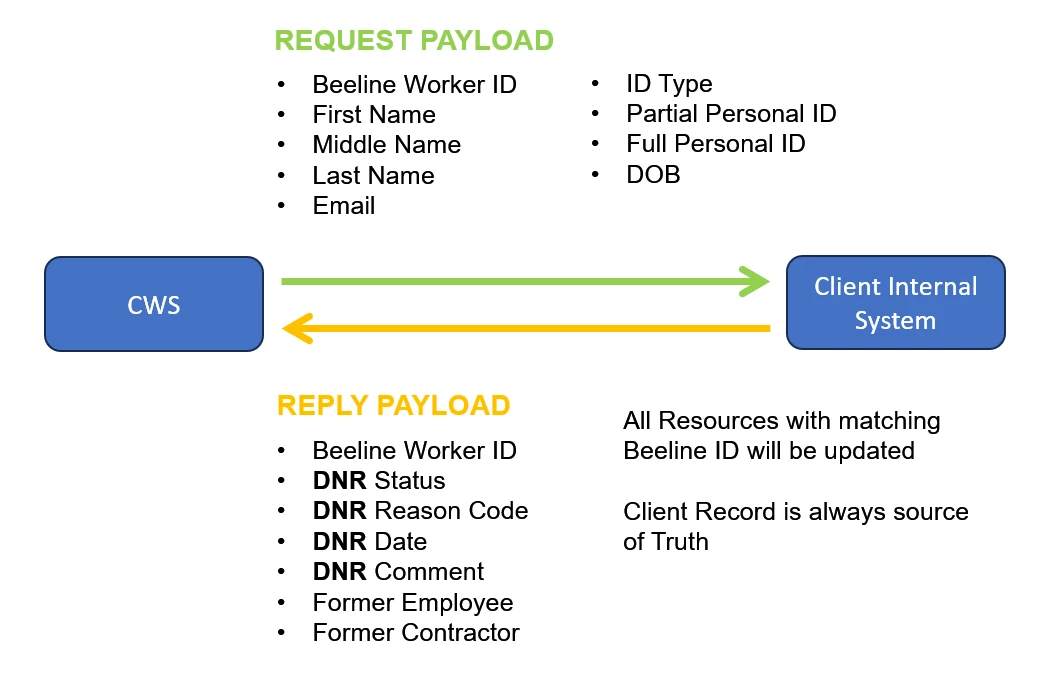
Your Beeline Candidate Eligibility solution and your API endpoint, exchange two types of payloads: request and reply.
Media type
Your Beeline Candidate Eligibility integration sends and receives payloads in JavaScript Object Notation (JSON). JSON is one of the most popular formats used to transfer data between websites and programs. It's a human-readable format and structured in a familiar style you'll recognize...it's essentially a mix of dictionaries and lists.
Your API endpoint must be set up to receive and send payloads denoted using the json_encode() function with “{}” in a query string.
You can structure JSON data in two basic ways: as a key/value pair or a collection of pairs, or as an ordered list. JSON supports these six data types: Array, Null, Boolean, String, Number, and Object.
About the request payload
Enterprise sends a request payload to your API endpoint. Your chosen procurement workflow integration determines when Beeline sends a request payload. See About the components for a list of supported integrations.
The request payload includes the extra data sent from the browser during the request. The request payload contains the following essential information about the request in a data block sent in the body of an HTTP GET request.
| Beeline Worker ID | BeelineWorkerID | string | 100 | yes | |
| First Name | FirstName | string | 100 | yes | |
| Middle Name | MiddleName | string | 200 | no | |
| Last Name | LastName | string | 200 | yes | |
| Contact Email | string | 510 | no | ||
| ID Type | IDType | string | 510 | no | |
| Partial Personal ID | InitialSSN | string | 100 | no | |
| Full Personal ID | FullSSN | string | 200 | no | |
| DOB (Date of Birth) | DOB | string | 10 | no | Date Format: MM/DD/YYYY For example: "01/31/2022" |
| Candidate ID | CandidateID | GUID | 16 | yes | Used by Beeline |
| Approval Step Instance ID | ApprovalStepInstanceID | GUID | 16 | yes | Used by Beeline |
Request payload example
{
"beelineworkerid" : "LiqNez06082324",
"firstname" : "Liqueen",
"middlename" : "",
"lastname" : "Nezo",
"email" : "",
"idtype" : "",
"InitialSSN" : "444",
"FullSSN" : "444444",
"DOB" : "",
"CandidateID" : "57d6407c-640b-42e0-9fb9-353eb1aee667",
"ApprovalStepInstanceID" : "777568c9-ad18-401a-8fdc-2f83a030bdbc"
}
About the response payload
The response payload is the normal reply from your API endpoint. It contains a response header and the response body in a data block sent in the body of an HTTP POST, PUT or PATCH message. The response payload contains and synchronizes the following data in your Beeline platform with the information in your databases.
| Beeline Worker ID | BeelineWorkerID | string | 100 | yes | ID used by Beeline to uniquely distinguish Candidates even when they are associated with different Suppliers.
|
| DNR Status | ReengageID | string | 2 | yes | Accepted values are 1, 2, or 3 1: OK to reengage 2: Alert, which corresponds to the DNR No status. 3: Do Not Reengage, which corresponds to the DNR Yes status. |
| DNR Reason Code | DNRReasonCode | string | 510 | Required when the ReengageID = 3; otherwise, optional> | Reason Code must be Active in Beeline. Reason codes are defined prior. Please consult with Implementation consultant and/or COMs to verify accepted values. |
| DNR Date | DNRDate | string | 10 | Required when ReengageID = 3; otherwise, optional | Date Format: MM/DD/YYYY For example, "07/31/2023" |
| DNR Comment | DNRComment | string | Required when the ReengageID = 2; otherwise, optional | ||
| Former Employee | FormerEmployee | Boolean | Optional | Accepted values are True or False | |
| Former Contractor | FormerContractor | Boolean | Optional | Accepted values are True or False |
Response payload exampleT
"beelineworkerid" : "LiqNez06082324",
|
Handling terminal errors
Integration failures may occur while data is exchanged between your Beeline Extended Workforce Platform and your API endpoint. When an error occurs, the Beeline platform generates and sends email notifications to Beeline’s Integrations team, your Program team and to the Supplier who submitted the Candidate. The email notifications include this information associated with the integration failure.
|
|
|
|
|
|
|
|
Note: Your Beeline's Integrations Team will identify the cause of the error and coordinate a resolution for the Beeline platform and your API endpoint.
Terminal validation errors
This topic outlines integration errors that might occur while data is exchanged between your Beeline platform and your API endpoint. Recommended actions and remediation steps are included.
Forbidden
Beeline authenticated and understood the Candidate Eligibility API endpoint request, but you don't have permission to access the resource and additional access can't be provided.
Error message
Authentication Error: 403 Forbidden; Bad Request
Recommended action
Review and confirm the correct API endpoint URL and authorization API endpoints URLs are configured based on the Data point exchange requirements. See About the components for requirements. Contact your Beeline representative and/or create a support ticket.
Remediation steps
-
Navigate to Beeline’s website.
- From the Navigation ribbon, select Support.
- From the Customer service and support page, select Request Assistance under Beeline Support.
- Select the type of assistance you need.
- Include the Beeline Candidate Eligibility Integration in the description of your support ticket.
Invalid API Base URL
Beeline was unable to establish a successful connection to the configured API endpoint URL because it lacks valid authentication credentials for the requested resource. The configured API endpoint URL was either invalid or doesn’t exist. Or there’s an incorrect URL, outdated browser cache and cookies, server configuration errors, or IP restrictions.
Error message
Invalid API URL (error 404 - Not Found)
Recommended action
Review and confirm the correct API endpoint URL and authorization API endpoints URLs are configured based on the Data point exchange requirements. See About the components for requirements. Contact your Beeline representative and/or create a support ticket.
Remediation steps
- Navigate to Beeline’s website.
- From the Navigation ribbon, select Support.
- From the Customer service and support page, select Request Assistance under Beeline Support.
- Select the type of assistance you need.
- Include the Beeline Candidate Eligibility Integration in the description of your support ticket.
Invalid Authentication Credentials
Beeline was unable to authenticate the Candidate Eligibility API endpoint due to missing or inaccurate authentication.
Error message
Authentication Error: 401 - Unauthorized
Recommended action
Review and confirm the correct API endpoint URL and authorization API endpoints URLs are configured based on the Data point exchange requirements. See About the components for requirements. Contact your Beeline representative and/or create a support ticket.
Remediation steps
-
Navigate to Beeline’s website.
- From the Navigation ribbon, select Support.
- From the Customer service and support page, select Request Assistance under Beeline Support.
- Select the type of assistance you need.
- Include the Beeline Candidate Eligibility Integration in the description of your support ticket.
Handling Nonterminal session errors
Currently, requests that encounter nonterminal session errors are retried indefinitely every fifteen minutes until the error is corrected. For example, web server traffic has decreased, and timeouts no longer occur; valid credentials were provided.
Service unavailable
Beeline is temporarily unable to handle your request. The Beeline server may be offline for maintenance or overloaded with requests. Your request is indefinitely retired every fifteen minutes until the error is corrected.
Error message
Error 503 – Service Unavailable
Recommended action
If the 503 error persists, contact your Beeline representative and/or create a support ticket.
Remediation steps
- Navigate to Beeline’s website.
- From the Navigation ribbon, select Support.
- From the Customer service and support page, select Request Assistance under Beeline Support.
- Select the type of assistance you need.
- Include the Beeline Candidate Eligibility Integration in the description of your support ticket.
Internal server error
The Beeline server encountered an unexpected condition that prevented it from fulfilling your request and your content cannot be loaded. Your request is indefinitely retired every fifteen minutes until the error is corrected.
Error message
Error 500 – Unexpected server error
Recommended action
If the 500 error persists, contact your Beeline representative and/or create a support ticket.
Remediation steps
- Navigate to Beeline’s website.
- From the Navigation ribbon, select Support.
- From the Customer service and support page, select Request Assistance under Beeline Support.
- Select the type of assistance you need.
- Include the Beeline Candidate Eligibility Integration in the description of your support ticket.
Connection timeout
The Beeline server didn’t receive a timely response from another server upstream when it attempted to load one of your web pages. Your web servers aren’t communicating with each other fast enough. The default response threshold is 30 seconds, which may be adjusted depending on your integration.
Error message
Error 504 - Gateway Timeout server error
Recommended action
Contact your Beeline representative and/or create a support ticket.
Remediation steps
- Navigate to Beeline’s website.
- From the Navigation ribbon, select Support.
- From the Customer service and support page, select Request Assistance under Beeline Support.
- Select the type of assistance you need.
- Include the Beeline Candidate Eligibility Integration in the description of your support ticket.
Handling Payload validation errors
This topic outlines integration errors that might occur while a Candidate Eligibility API endpoint response payload is processed. Recommended actions and remediation steps are included.
Malformed API JSON Response
Beeline was unable to process the response retrieved from your Candidate Eligibility API endpoint. The response payload either contains an invalid property or isn’t in the correct JSON format.
Error message
Malformed request (error 400 - Bad Request)
Recommended action
Contact your Beeline representative and/or create a support ticket.
Remediation steps
- Navigate to Beeline’s website.
- From the Navigation ribbon, select Support.
- From the Customer service and support page, select Request Assistance under Beeline Support.
- Select the type of assistance you need.
- Include the Beeline Candidate Eligibility Integration in the description of your support ticket.
Unable to parse data
Beeline is having trouble understanding what you’re telling it to do in your response request. You may have data incorrectly formatted, such an incorrect email format or an incorrect phone number format.
Error message
Data in the request cannot be parsed
Recommended action
To fix the issue, and check your work for mistakes, then try again. Go to Response payload to ensure you’re using the expected formats.
Supported release: Beeline Q4 2023