


Enable interview scheduling recommendations using Google Calendar availability
Configure the Interview Manager Google Calendar integration to allow Interview Manager to use Google Calendar availability when generating interview scheduling recommendations.
After the integration is configured, Interview Manager can identify common availability across interview participants and recommend interview times that maximize attendee participation.
Why it matters
Proper configuration is required before Interview Manager can:
- Retrieve Google Calendar availability information.
- Generate interview scheduling recommendations.
- Identify common availability across participants.
- Use Google Calendar data during interview scheduling.
Who it's for
This article is intended for:
- Client Operations Managers (COMs).
- Interview Manager administrators.
- Google Workspace administrators responsible for Google Calendar integration setup.
How it helps
Configuring the integration enables Interview Manager to:
- Retrieve Google Calendar availability for interview participants.
- Compare availability across multiple attendees.
- Generate interview scheduling recommendations based on common availability.
- Reduce manual schedule coordination.
- Streamline scheduling for interviews involving multiple participants.
Availability and setup
The Interview Manager Google Calendar integration is an optional feature.To use the integration, your organization must:
- Have Interview Manager enabled.
- Submit a Service Request to enable the Google Calendar integration.
- Complete the required Google Workspace configuration.
The Google Calendar integration is enabled at the organization level and cannot be enabled for specific geographies, industries, hiring managers, or individual users. For answers to common implementation, security, and support questions, see Google Calendar Integration FAQs.
After the integration is enabled, administrators can manage applicable Interview Manager settings. For more information, see Interview Manager Self-Service Configuration.
Note: The Google Calendar integration provides availability-based scheduling recommendations. Unlike Outlook Calendar Invite Notifications, the Google Calendar integration does not automatically add interview events to recipients' calendars.
Before you begin
Before configuring the Google Calendar integration:
- Verify that your organization uses Google Calendar.
- Ensure you have access to the required Google Workspace administration tools.
- Determine which Google Workspace domains will use the integration.
- Identify the Google Workspace administrator responsible for configuring the integration.
- Review your organization's security and access requirements before granting permissions.
Requirements and prerequisites
Interview Manager uses the Google Calendar integration to access attendee availability. Schedule recommendations are based on client attendees' Google Calendar availability.
Using the Google Calendar integration requires preparation by your Google Workspace administrator and a Service Request.
| Requirement | Description |
|---|---|
| Google Calendar | Your organization must use Google Calendar. |
| Google Workspace administrative access | Administrative access is required to configure the integration. |
| Domain Wide Delegation | Domain Wide Delegation must be configured to authorize the integration. |
| Google API permissions | Required Google permissions must be granted. |
| Authentication credentials | Required authentication information must be provided. |
| Domain information | Domain information must be supplied for integration configuration. |
| Service Request | A Service Request is required to enable the Google Calendar integration. |
Domain configuration
The Google Calendar integration uses domain information as part of the subscription configuration.
Organizations that use multiple domains can configure separate subscription entries for each domain. For example:
- johnsmith@zcompany-eu.com
- janejohnson@zcompany-asia.com
The domain is extracted as part of the subscription configuration and associated with the applicable Google Calendar integration subscription.
This allows organizations that use multiple Google Workspace domains to configure separate subscription entries as needed.
Service account recommendation
Beeline recommends using a dedicated service account email address for the integration.
Using a service account helps avoid service interruptions if an employee account is disabled, deleted, or modified after the integration is configured.
Required permissions
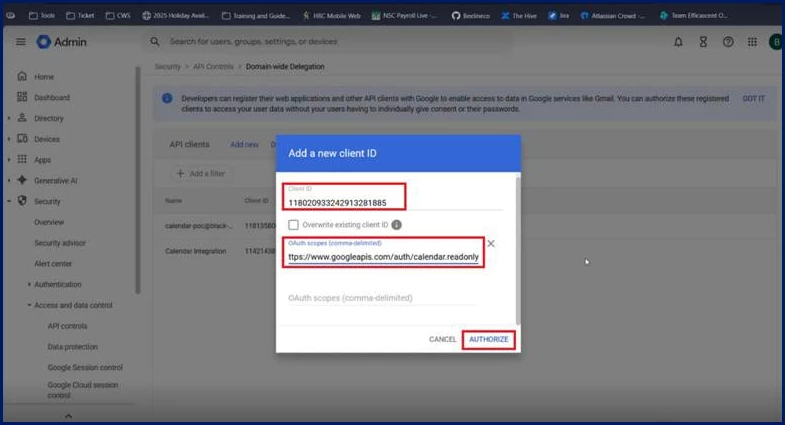
The Google Calendar integration requires the following OAuth scope: https://www.googleapis.com/auth/calendar.readonly
This permission allows Interview Manager to retrieve calendar availability information used to generate interview scheduling recommendations.
The integration uses read-only calendar access and does not require permission to modify calendar events.
Security and access
Interview Manager uses Google's authentication and authorization framework to connect securely to Google Workspace. Understanding how the integration connects and what controls are available can help your organization evaluate, configure, and manage access appropriately.
How Interview Manager securely connects to Google Workspace
Interview Manager uses a Beeline service account and Google Workspace Domain Wide Delegation to access calendar availability information.
Access is controlled through administrator-approved application permissions rather than individual user authentication.
The integration uses read-only calendar permissions and retrieves only the information needed to generate interview scheduling recommendations.
The integration is configured specifically for your Google Workspace environment and doesn't rely on shared-user access.
Available access controls
Your organization can implement additional Google-supported controls to further restrict access, including:
- Limiting access to approved users and domains.
- Restricting permissions to only those required.
- Managing administrator approval and consent.
- Revoking access when it is no longer needed.
DISCLAIMER: The graphics shown in the following steps are examples only. They are not intended to represent Google’s user interface nor to represent your user experience.
Information in this article reflects a standard Enterprise configuration. Your Enterprise platform is based on your organization’s configuration. Settings and/or data visibility rules may vary slightly from what is described.
Setting up the Google Calendar integration
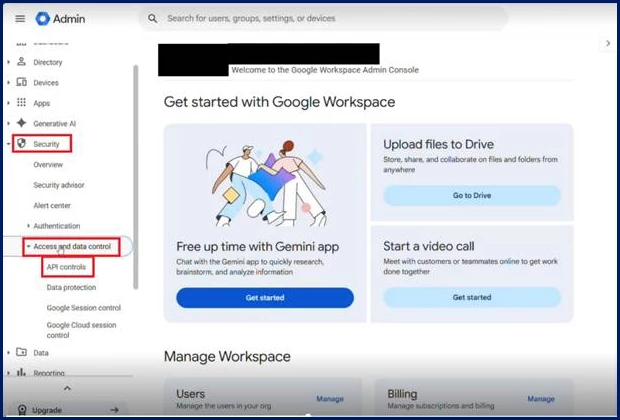
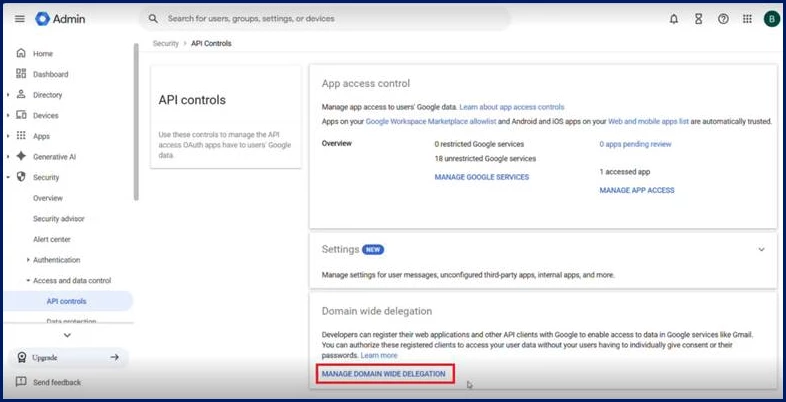
Using Beeline’s Google Calendar integration with Interview Manager requires some preparation on your part and a Service Request ticket. Your Google Workspace administrator must complete the following tasks before your organization can use the Google Calendar integration.
Complete the following tasks in Google Workspace before configuring the integration in Enterprise.
| Task |
|---|
|
|
|
|
Configure the Google Calendar Integration in Enterprise
Complete the following steps in Enterprise after the required Google Workspace configuration and Service Request activities are complete.
This configuration creates an Interview Calendaring Subscription Entry that allows Interview Manager to retrieve Google Calendar availability and generate interview scheduling recommendations.
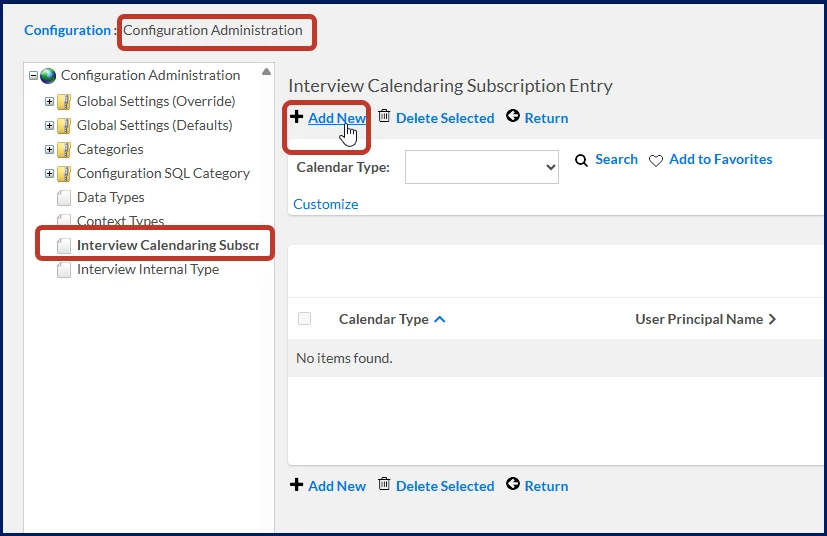
- Select Admin > Configuration. A Configuration Administration page displays.
- From the left Navigation, select Interview Calendaring Subscription Entry. An Interview Calendaring Subscription Entry page displays.
- Select Add New.
What this does: Creates a new subscription entry that connects Interview Manager to a Google Workspace domain.
Why this matters: Interview Manager uses subscription entries to determine which Google Calendar environment to use when generating interview schedule recommendations.
In simple terms: This creates the connection between Interview Manager and a specific Google Workspace domain.
- From the Calendar Type list, select Google Calendar.
What this does: Identifies the calendar platform associated with the subscription entry.
Why this matters: Interview Manager uses this value to determine how calendar availability requests are processed.
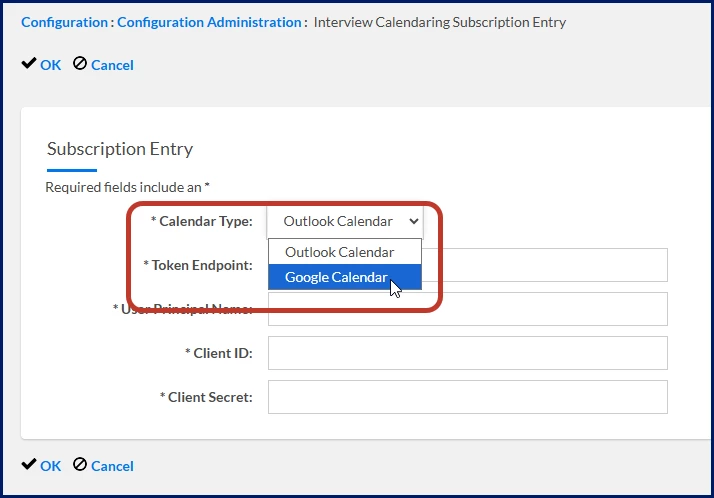
- In the User Principal Name field, enter any email address from the same domain as the workspace that granted access.
What this does: Associates the subscription entry with a Google Workspace domain.
Why this matters: Interview Manager uses the email domain to determine which calendar subscription to use when retrieving availability information.
In simple terms: This tells Interview Manager which Google Workspace domain is connected to this integration.
- Select OK to add the calendar subscription entry.
| Persona | Module | Date Posted | Feedback? Email us: |
| Clients, program office users, system admins | Contingent Staffing APIs & Integrations | Beeline Enterprise | Q4 2026 |