


Plan with freedom. Manage with ease. Enforce with confidence at the project level.
Project-Level NTE Enforcement simplifies services budget management by consolidating control into a single project-level “not-to-exceed” (NTE) amount. Instead of managing budgets across individual assignments, you can focus on delivering work while the system enforces spend precisely when it matters—at timesheet submission.
Project-Level NTE Enforcement extends traditional T&M budget enforcement but fundamentally changes how budgets are managed. While T&M Budget Enforcement adds validation on top of an assignment-based structure, Project-Level NTE Enforcement replaces assignment-level controls entirely with a streamlined, project-level budget model.
This approach is especially valuable for time and materials (T&M) engagements, where billing is based on actual time worked and expenses rather than predefined deliverables. In those scenarios, estimated hours guide planning and reporting, but they don’t control real spend.
By separating planning from how spend is controlled and making estimated hours optional, you reduce administrative overhead while aligning budget management with how services actually operate.
A seamless, one-time rebase allows you to adopt this model for existing projects without disrupting work, creating a more efficient, predictable, and scalable budgeting experience.
Why it matters
- Align budget enforcement with actual time-based spend rather than estimates
- Standardize how budgets behave across T&M and services engagements
- Enable flexible planning without financial constraints
- Improve predictability with consistent, project-level enforcement
- Support real-world billing models based on time and expenses
- Scale across T&M, managed capacity, and hybrid engagements
Who it’s for
- Project and program managers who want flexible planning with less administrative overhead
- Procurement teams managing SOW-based and time-based services engagements
- Finance teams enforcing NTE limits with accuracy and consistency
How it helps
- Reduce manual effort: Eliminate the need to maintain estimated hours for budget movement
- Simplify budgeting: Manage one shared project budget instead of multiple assignment budgets
- Keep work moving: Complete assignment actions without interruptions or rework
- Improve efficiency: Minimize SOW updates and budget adjustments
- Ensure control: Automatically enforce limits when actual spend occurs
How it works
This model gives you flexibility during planning and enforces spend at submission.
🔷Understand the flow
| Phase | What happens | Benefit to you |
|---|---|---|
| Plan | Estimated hours are optional and used for visibility only | Plan without constraints or extra maintenance |
| Assign | No budget validation during create, update, or cancel actions | Keep workflows fast and uninterrupted |
| Consume | Approved timesheets draw from a shared project budget | Align spend directly to work performed |
| Enforce | System validates against the project-level NTE at submission | Prevent overspend with precision |
What’s different (and why adopt it)
Spend less time managing budgets and experience consistent enforcement exactly where it counts.
🔷Understand the difference
| Area | Assignment-based control (underlying model) | T&M budget enforcement (legacy feature) | Project-level NTE enforcement |
|---|---|---|---|
| What it is | Budgeting based on assignments and estimated hours | Validation added at timesheet submission | Simplified model with built-in enforcement |
| Budget structure | Distributed across assignments and totals | Same structure with added validation | Single shared project-level budget |
| Estimated hours and rates | Drive budget calculations | Still influence budget management | Not validated against your project budget |
| Assignment lifecycle | Budget logic tied to assignments | May require monitoring or adjustments | No validation or rebalancing during actions |
| Budget ownership | Spread across assignments | Still tied to project totals | Fully centralized at project level |
| Timesheet submission | Not consistently enforced | Checked against available budget | Checked against project-level NTE |
| Enforcement timing | Inconsistent across lifecycle | Enforced at submission | Enforced at submission (clean model) |
| Operational complexity | High | Moderate | Low |
| Overall approach | Complex and constraint driven | Adds control to complex model | Simplifies and replaces the model |
User experience
Project-Level NTE Enforcement simplifies how you manage budgets throughout the project lifecycle. You no longer manage budgets through assignment-level constraints and estimated hours. You plan flexibly and rely on consistent, project-level enforcement at the point of spend.
🔷Explore the experience
What you’ll notice
-
A single, clear project budget
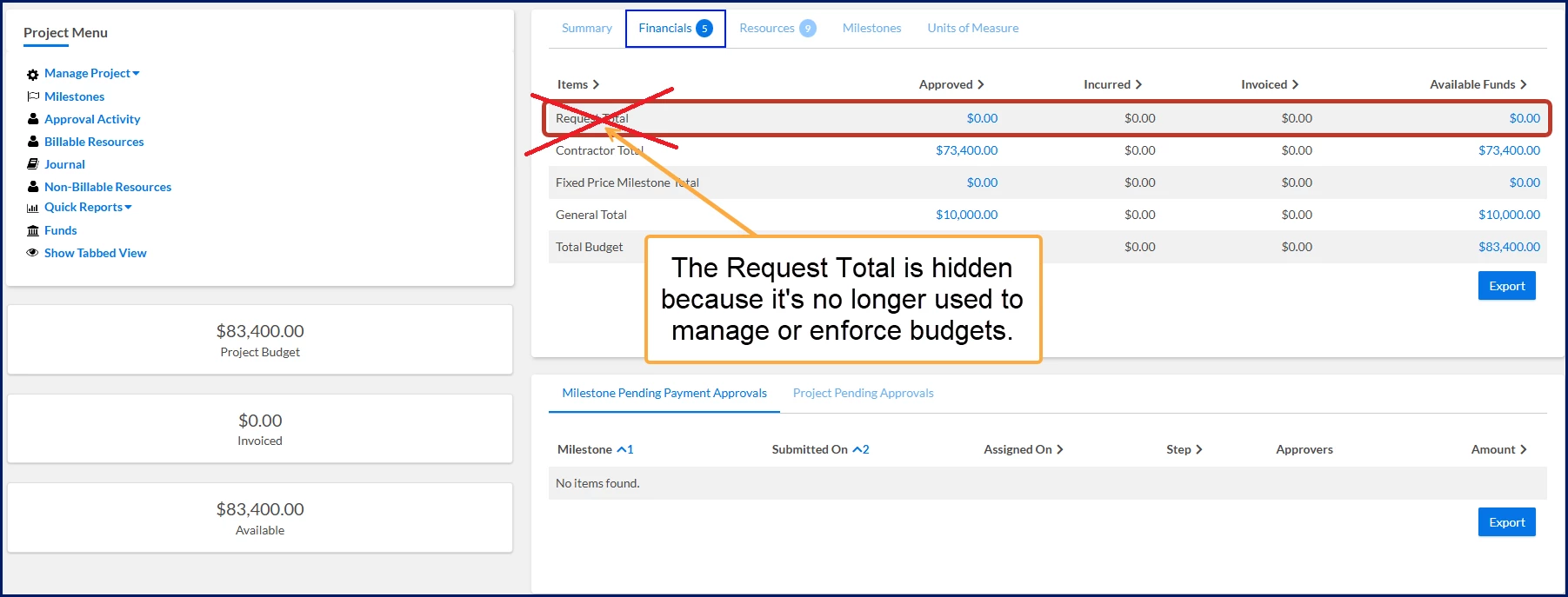
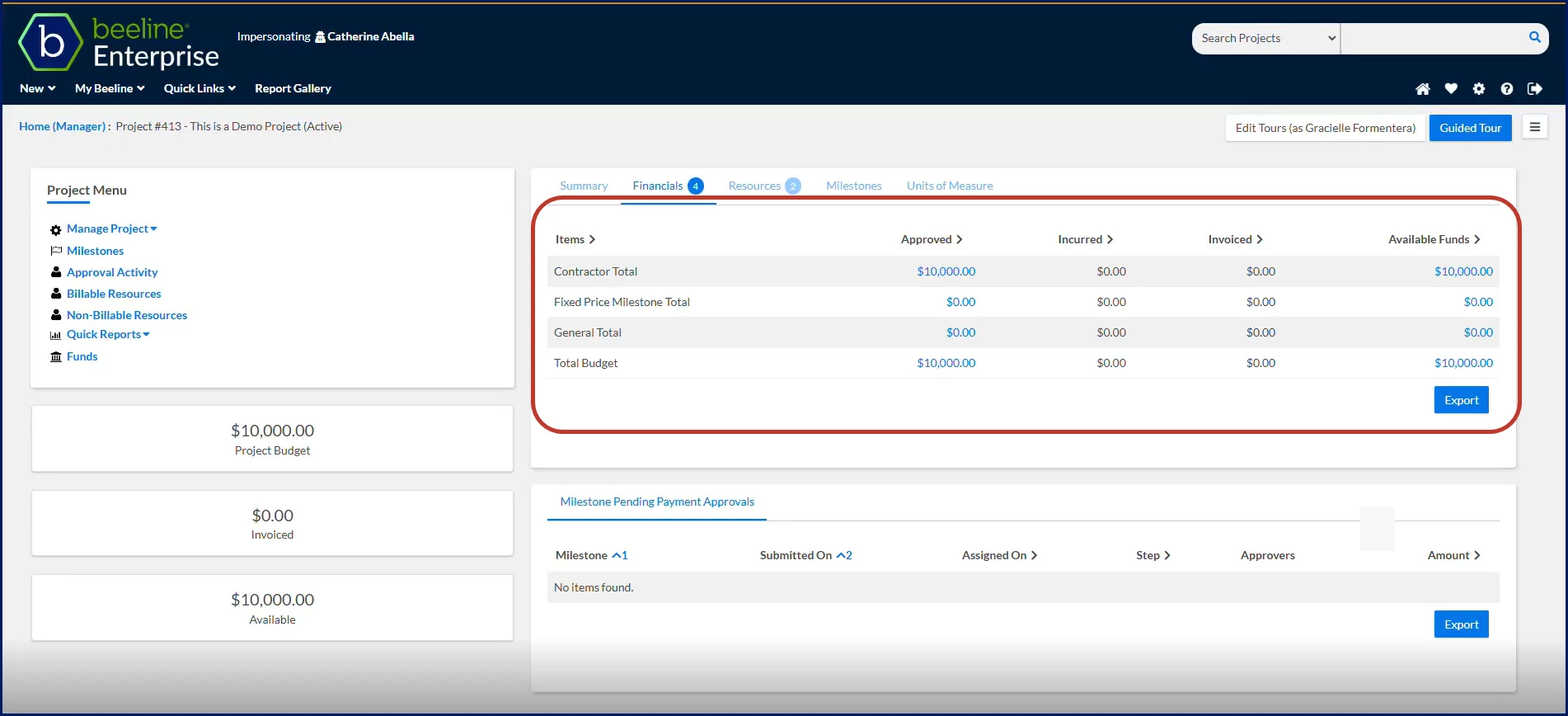
The Request Total is hidden because it’s no longer used to manage or enforce budgets. The project budget flows directly from the SOW resource bucket into the Contractor/Resource project-level total. No need to track or move funds across multiple totals. -
No budget constraints during planning
You can create requests and assignments even if their combined estimated value exceeds the project budget. These values guide planning but do not block work. -
Frictionless assignment management
You can update, cancel, or terminate assignments without validation errors or fund rebalancing. -
No fund transfers or rebalancing
Budget management is simplified to one project-level amount. No movement between general, request, or contractor totals. -
Enforcement at the right time
The system validates budget limits during timesheet submission, preventing overspend only when actual costs are incurred.
How the experience changes across the lifecycle
| Stage | What you can do | What changes | Benefit to you |
|---|---|---|---|
| SOW and project setup | Define project budget in resource bucket | Budget flows directly to project-level total | Simplify budget structure |
| Request and assignment creation | Create work exceeding project budget | No validation or fund allocation | Plan and staff work freely |
| Assignment updates | Cancel or terminate assignments | No fund return or validation errors | Avoid interruptions and rework |
| Project management | Manage multiple assignments | No budget redistribution required | Reduce administrative effort |
| Timesheet submission | Submit hours for work performed | Validated against project-level NTE | Enforce spend consistently |
What this means day-to-day
You spend less time managing budgets and resolving validation issues, and more time delivering work. You can plan resources freely, make updates confidently, and rely on the system to enforce budget limits consistently when spend actually occurs.
What changed
When Project-Level NTE Enforcement is enabled, you’ll notice that Request Total is no longer visible. This is an intentional change to simplify how budgets are managed.
- Budget is managed only at the project level
- The Contractor/Resource Total is the single source of truth
- Funds flow directly from the SOW—no transfers between totals
What this means for you
- Simpler view: One project budget instead of multiple totals
- No fund movement: No manual transfers or rebalancing
- Fewer errors: No validation issues tied to budget returns
Action steps
Adding Project-Level NTE Enforcement to your Beeline Enterprise VMS or rebasing an existing project requires a Make a Change ticket and Enterprise configuration. After the feature is setup, all new projects automatically benefit from flexible planning, reduced effort, and consistent enforcement.
Transition existing projects (rebase)
To extend this model to existing projects, complete a one-time rebase with your Beeline representative.
Prepare for transition
- Identify project types for rollout
- Plan for a one-time rebase for existing projects
- Confirm readiness for ongoing project-level enforcement
Rebase process
| Step | What you do | What the system does | Benefit to you |
|---|---|---|---|
| 1 | Select a T&M project type | Targets rollout safely | Apply changes where and when needed |
| 2 | Enable Rebase Existing Project Budgets | Moves funds into a shared contractor/resource total | Simplifies and standardizes budget structure |
| 3 | Allow system alignment | Synchronizes budgets with funded SOWs | Ensures consistency across all projects |
| 4 | Enforcement activates | Applies project-level NTE automatically | Delivers lasting, system-driven control |
Result: A smooth, one-time transition that modernizes budget management without disrupting active work.
| Persona Clients, program office users | Modules Services Procurement | Documentation release Beeline Enterprise | Q2 2026 | Feedback? Email us: |