


Smarter talent matching for a stronger workforce
In today’s fast‑paced talent landscape, every second counts—and so does every candidate profile. Beeline Enterprise’s Resource Matching Intelligence introduces a new level of clarity and efficiency to the submission and review process by intelligently identifying duplicate and overlapping candidate records before they slow you down.
By leveraging historical profile attributes—such as name, date of birth, email, and resume data—the system uses advanced similarity scoring to detect true matches across suppliers and prevent redundant submissions.
This intelligent matching capability not only streamlines workflows but also elevates workforce quality. With automated sorting by match probability and immediate alerts for potential duplicates, hiring teams can spend less time manually reviewing profiles and more time engaging with the right talent. The result is cleaner data, faster decisions, higher alignment, and improved utilization of known, high-quality candidates.
To learn more about the Resource Matching feature, go to this article.
Action required
Your organization must have subscribed to the Premium AI package before you can add the Resource Matching Intelligence feature to Beeline Enterprise. AI packages can be added to Enterprise via a Make a Change ticket. Contact your Relationship Manager for details.
Persona
Clients, program office users, system administrators
How to steps
You can turn on Resource Matching Intelligence via self-service from VMS Settings. Plus, you can turn off the Resource Matching Intelligence feature for specific industries if your organization wants to limit where Resource Matching Intelligence is available.
Information in this article reflects a standard Enterprise configuration. Your Enterprise platform is based on your organization’s configuration. Settings and/or data visibility rules may vary slightly from what is described.
To accomplish your task, complete these steps from your Enterprise dashboard.
- Select Preferences > VMS Settings > Artificial Intelligence. An Artificial Intelligence page displays.
TIP: After you navigate to the Artificial Intelligence page, you may see features you cannot configure. Although all AI features display, what’s available to you varies based on the specific AI package to which your program subscribes. - Under the Premium section, select the Resource Matching Intelligence link. A Resource Matching Intelligence page displays.
- Select the Enable Resource Matching Intelligence checkbox.
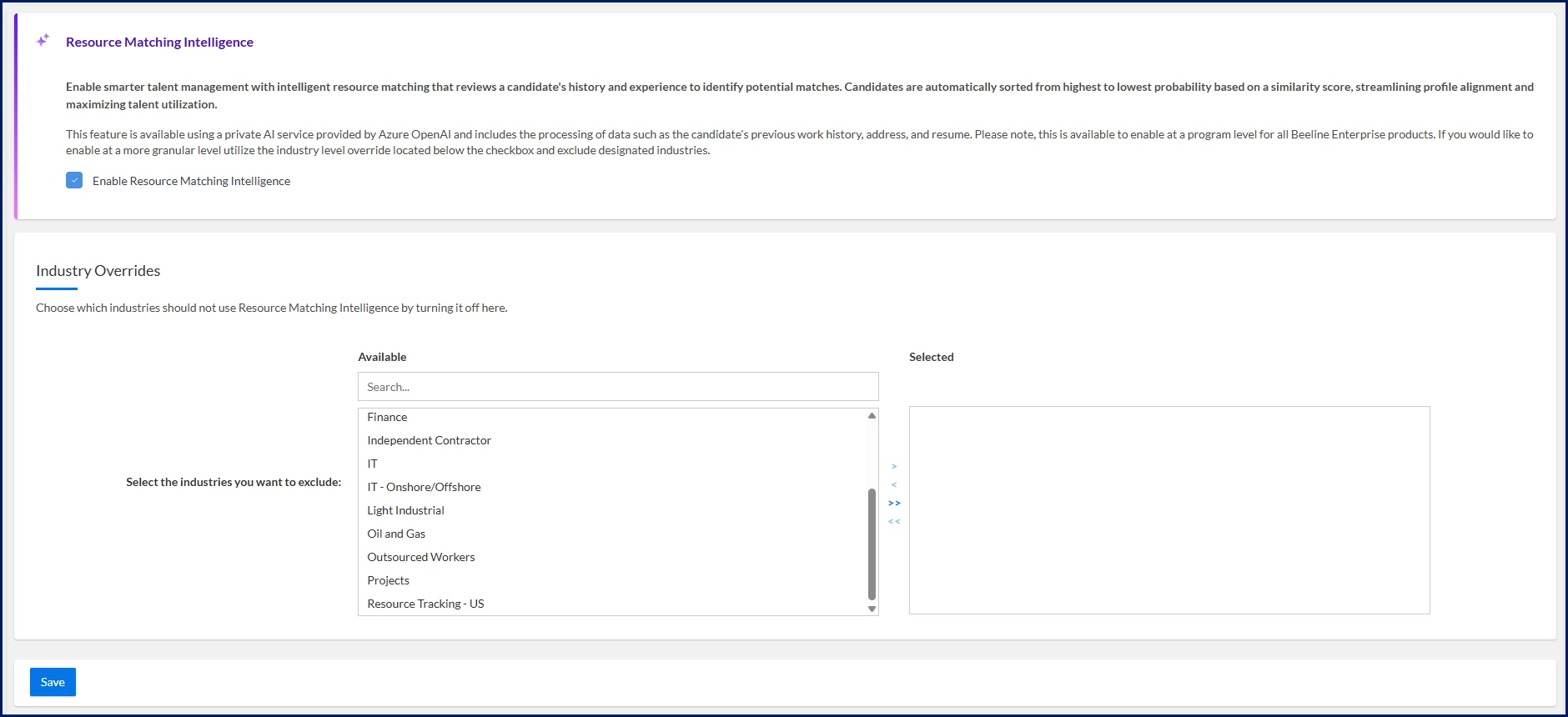
- Optional. From the Available list in the Industry Overrides section, select the industries you want to exclude, and then use the Arrows to move your selections to the Selected list.
- Select Save to apply your selections and go back to the Artificial Intelligence page.
Resource Matching Intelligence is set up for your site and not available in any industries you excluded.
| Persona Clients, program office users, system administrators | Modules Artificial Intelligence | Documentation release Beeline Enterprise | Q1 2026 | Feedback? Email us: |