


Get the guidance you need, one question at a time
Guide Me Studio helps you make informed decisions by walking you through a series of guided questions. Based on your answers, Guide Me Studio evaluates your situation and provides a recommended outcome, helping you choose the appropriate next step without needing to review detailed policies or requirements on your own.
Why it matters
- Reduces uncertainty when you're not sure what action to take.
- Helps you make informed decisions using a consistent process.
- Saves time by guiding you directly to a recommended outcome.
- Increases confidence that you're following the appropriate path for your situation.
Who it's for
- Hiring managers
How it helps
- Asks targeted questions based on your responses.
- Tracks your progress throughout the workflow.
- Maintains a history of your answers for easy review.
- Lets you update previous answers when needed.
- Provides a recommended outcome based on your completed responses.
Availability and setup
- Guide Me must be configured and published by your organization's administrators before it is available.
- Available workflows, questions and outcomes are determined by your organization.
Before you begin
- Ensure you understand the situation or request you need assistance with.
- Gather any information you may need to answer the questions accurately.
- Plan to answer all questions, as recommendations are based on your responses.
- Be prepared to update answers if your situation changes during the process.
Use Guide Me to determine the right next step
Information in this article reflects a standard Enterprise configuration. Your Enterprise platform is based on your organization’s configuration. Settings and/or data visibility rules may vary slightly from what is described.
To accomplish your task, complete these steps from your Enterprise dashboard
-
From the Create app in the Hiring Manager Experience or from the Navigation menu in Beeline Classic, select Guide Me.
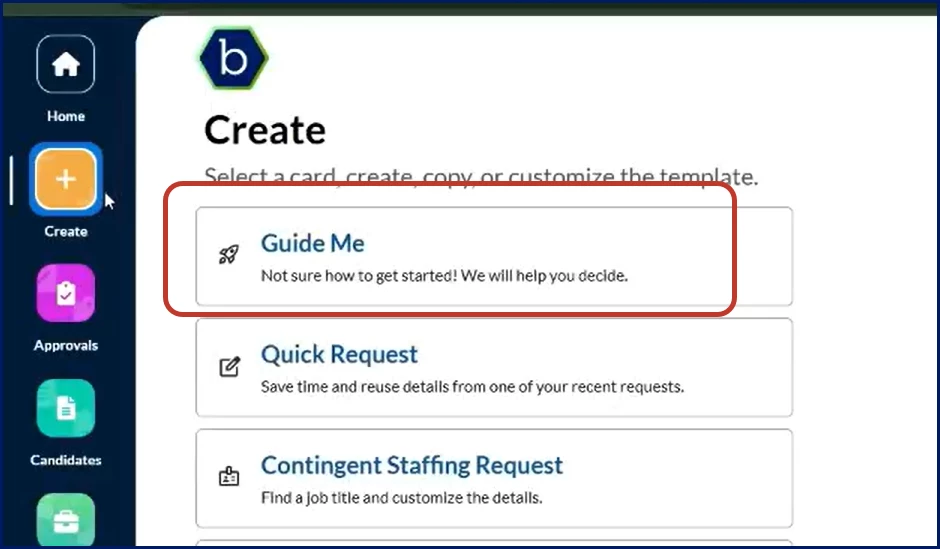
Create app 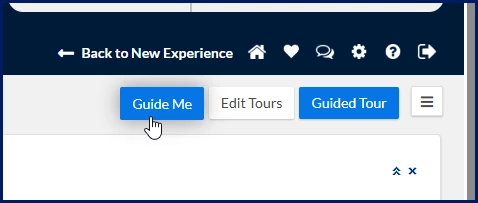
Beeline Classic
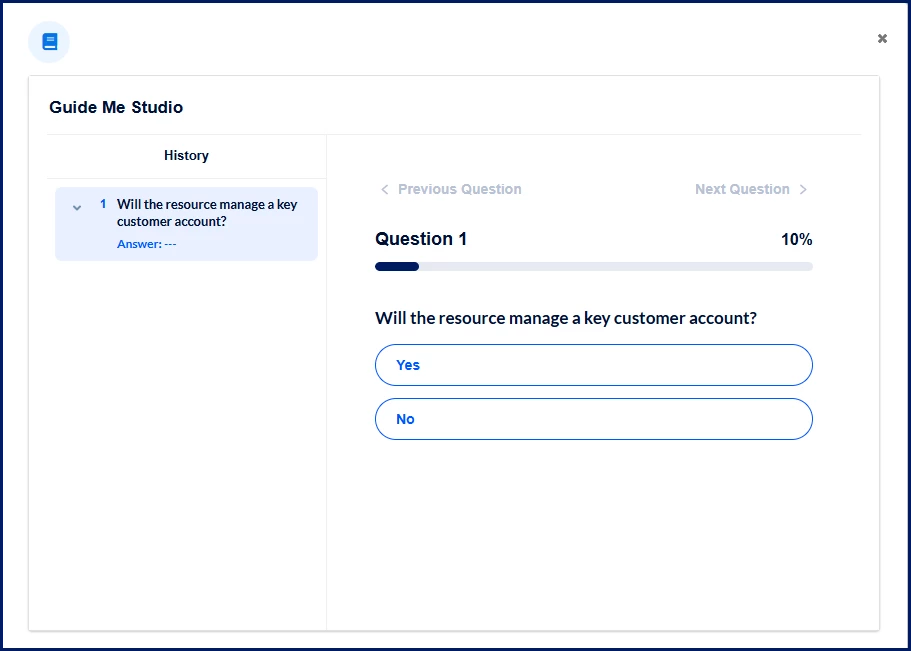
The guided workflow opens in a dialog.
-
Review the current question. The page displays:
- The current question number.
- Your overall completion percentage.
- Available answer options.
- A history panel showing previously answered questions.
-
Select the answer that best matches your situation. Your response is saved and the next question displays automatically.
-
Continue answering questions until you reach the final outcome.
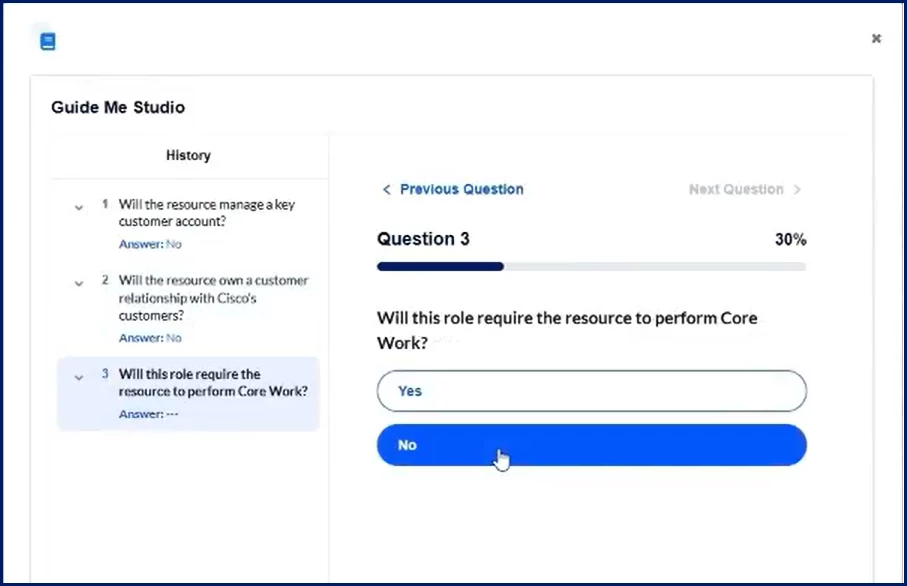
As you progress:- The completion percentage updates.
- Your answer history expands.
- Previous answers remain available for review.
-
If you need to review or change an answer, use one of the following options:
Option Result Select Previous Question Returns to the previous question. Select a question in the History panel Opens that question for review. Change an answer Updates the workflow path and refreshes subsequent results based on your new selection. -
Review the recommended outcome.
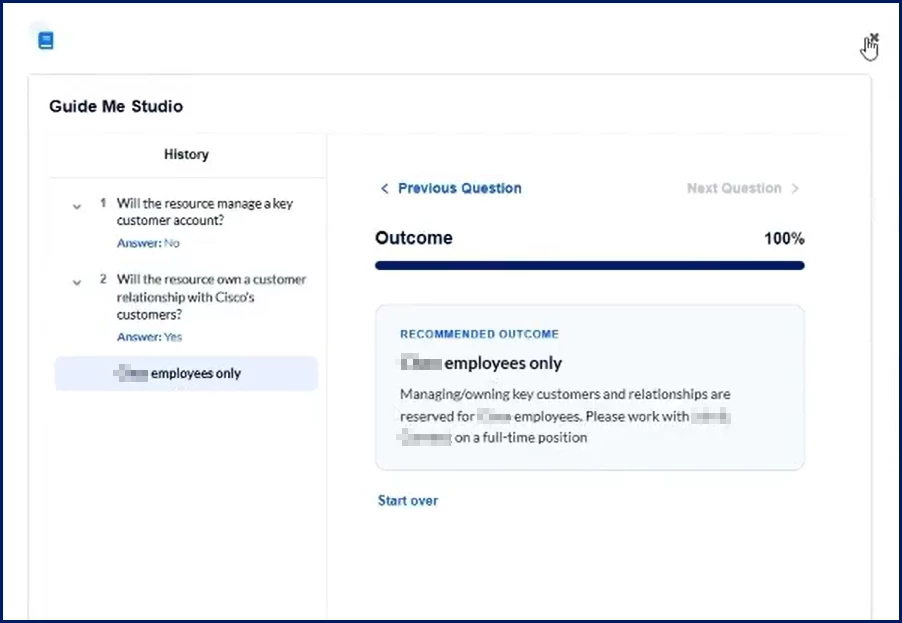
When you complete all required questions:- Progress reaches 100%.
- A Recommended Outcome displays.
- The outcome provides guidance based on the answers you selected.
-
If needed, select Start over to restart the workflow and answer the questions again.
What you'll see
| Feature | Description |
|---|---|
| Progress indicator | Shows how far you are through the guided workflow. |
| Question area | Displays the current question and available answers. |
| Answer options | Selectable responses used to determine the recommendation. |
| History panel | Lists previously answered questions and responses. |
| Previous Question | Returns to the prior question. |
| Recommended Outcome | Displays the final guidance after all questions are completed. |
| Start over | Restarts the workflow from the beginning. |
Frequently asked questions
Can I change an answer after I select it?
Yes. You can return to a previous question using the Previous Question option or select a question from the History panel. If you change an answer, Guide Me updates the remaining workflow based on your new response.
Are recommendations always the same?
No. Recommendations depend on the answers you provide during the guided workflow.
Can I restart the process?
Yes. Select Start over from the outcome page to begin again.
What if Guide Me is unavailable?
Guide Me availability depends on whether your organization has enabled and configured the feature. Contact your administrator or support team if you cannot access it.
| Persona Hiring Managers | Modules Contingent Staffing | Documentation release Beeline Enterprise | Q3 2026 | Feedback? Email us: |