


The import tool validation process checks the data in the import file to determine if it meets the data requirements needed in your Beeline Enterprise production instance. Any line item in the file with data that does not match the expected format rules and inclusion requirements will generate an “error”. All errors need to be resolved before the file can be imported. You may need to repeat the validation process several times before you have a file that “passes” without any errors. Our Beeline CWS Import Error Guide lists the most common errors and how to resolve them.
Click to download the Beeline CWS Import Error Guide workbook.
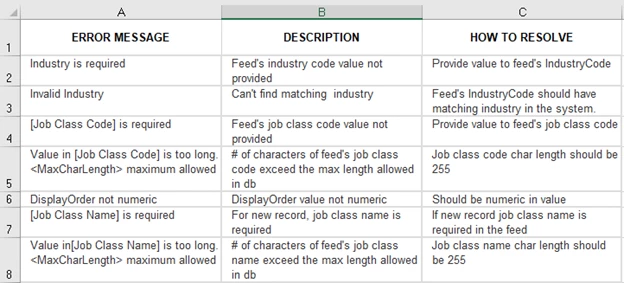
In the workbook, the Overview tab (first tab) is an index to all the imports that are included in the guide. Click the hyperlink or the tab to go to a specific import template error list.
Each list includes:
- ERROR MESSAGE (Column A) – The displayed error message should match the message in the “No” items on the View Details screen.
- DESCRIPTION (Column B) – This is an explanation of the error or what caused the error. In some instances, it may be a repeat of the content in Column A. These descriptions are created by Beeline staff who specialize in database management so the terminology is frequently technical in nature.
- HOW TO RESOLVE (Column C) – This content explains how to resolve/correct the validation error.
♦ Additional details and instructions for working with import template files can be found in the Web Import Tool Guide located here.
| Persona | Module | Date Posted | Feedback? Email us: |
| Admin / Managers | All | Beeline Enterprise |