Phone number validation helps you catch formatting issues before a Resource Profile is saved. To ensure accurate contact information, phone numbers must include a valid country code, the correct number of digits for the selected country, and only supported characters. The same validation applies across Resource Profiles, Security User Profiles, and Web Import templates.
Why it matters
Improve phone number data quality across Enterprise.
Support downstream processes that rely on accurate contact information.
Help prevent delays caused by incorrect phone number data.
Create more consistent worker contact information across your organization.
Who it's for
Client administrators.
MSP administrators.
How it helps
Validates phone numbers when Resource Profiles are saved.
Checks country-specific phone number formatting requirements.
Displays clear error messages when validation fails.
Applies validation to Resource Profiles, Security User Profiles, and supported Web Import templates.
Helps ensure new and updated phone numbers follow the same format standards.
Availability and setup
Client Administrator and MSP Administrator access with appropriate permissions.
Feature enablement through Preferences > VMS Settings > Data Management > Phone Type Format Validation.
Validation support for Resource Profiles, Security User Profiles and supported Web Import templates.
Default validation formats provided by Beeline.
Changes to the default validation format require a Service Request.
Understand where validation applies
Area
Validation behavior
Resource Profiles
Validates Business, Mobile, Fax, and Home phone numbers when saved.
Security User Profiles
Applies the same phone number validation rules.
Web Import templates
Validates phone numbers during import processing.
Supported Web Import templates include:
Resource Phone
Resource
Resource User Contact Information
Before you begin
Verify that you have access to VMS Settings.
Verify that any required updates to phone type validation formats have been requested through Beeline.
Information in this article reflects a standard Enterprise configuration. Your Enterprise platform is based on your organization’s configuration. Settings and/or data visibility rules may vary slightly from what is described.
To accomplish your task, complete these steps from your Enterprise dashboard.
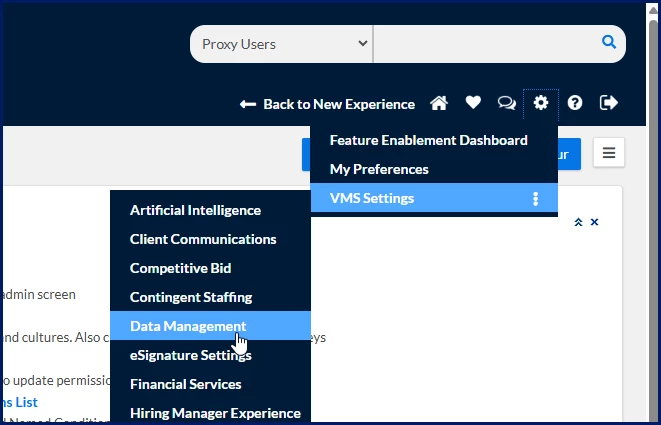
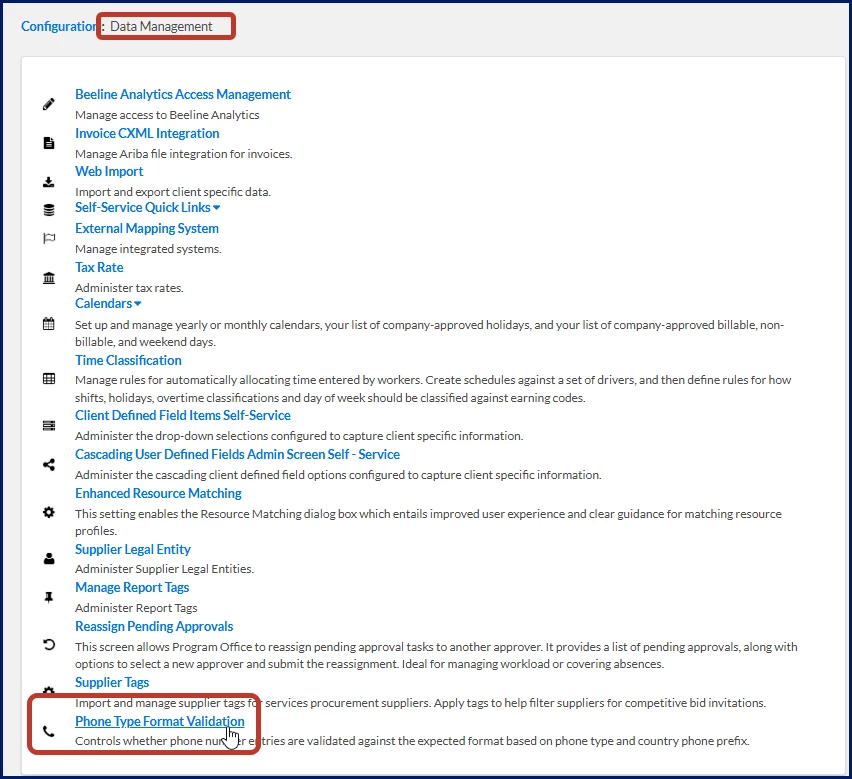
Select Preferences > VMS Settings > Data Management. A Data Management page displays.
Select Phone Type Format Validation.
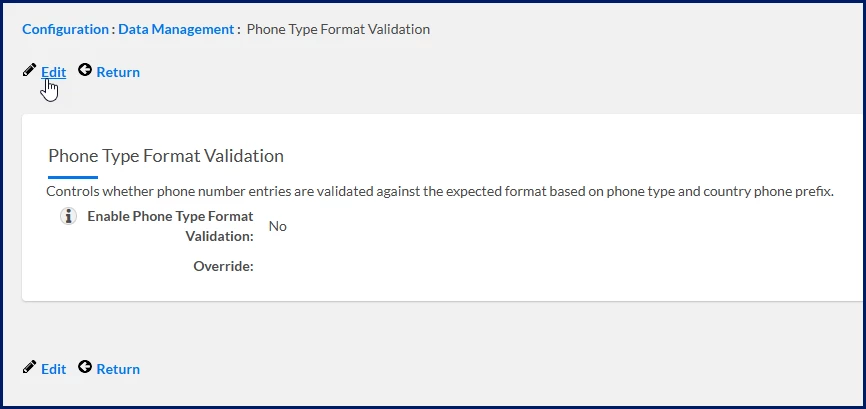
A Phone Type Format Validation page displays.
Select Edit.
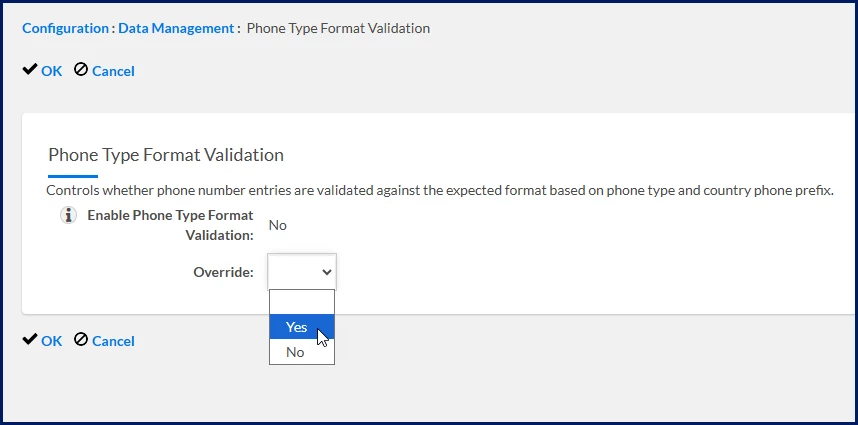
For Enable Phone Type Format Validation, select Yes from the Override list.
What this does: Enables phone number validation for your organization.
Why this matters: Phone numbers are validated before they can be saved, helping prevent incorrectly formatted data from being stored.
Select OK. The configuration is saved.
Understand phone number requirements
Phone numbers must meet the configured requirements for the selected country and phone type.
Requirement
Description
Country code
Use a recognized country code.
Number length
Enter the required number of digits for the selected country.
Format
Use dashes (-) where required.
Special characters
Do not enter unsupported special characters, spaces, or punctuation.
What users experience
Phone number validation helps you identify and correct formatting issues before a Resource Profile is saved.
Step
What you experience
Benefit
Select a country code
Choose the appropriate country code for the phone number.
Apply validation requirements that match the selected country.
Save the profile
Save the Resource Profile after entering the phone number.
Validate the phone number before it is stored and used elsewhere in Enterprise.
Enter a valid phone number
The profile saves successfully when the phone number meets the configured format requirements.
Maintain accurate, consistent phone number data.
Enter an invalid phone number
An error message identifies the formatting issue and prevents the profile from being saved until it is corrected.
Correct problems immediately instead of finding them later in downstream processes.
Reporting behavior
Validated phone numbers are available in reporting, helping improve the consistency and quality of phone number data throughout Enterprise.
Please complete the following fields as part of your Beeline Community registration. Unless noted as private, this information will be displayed on your user profile within the community.