


Automate complex rate adjustments!
Your team operates around the world at all hours of the day using different languages and currencies. Managing the rate, time, and expense functions of your contingent workers and third-party services can be complex and challenging.
Beeline Rate, Time, & Expense (RTE) features give you the power and flexibility to automatically allocate worker time to multiple rate premiums—simplifying managing rates, time and expense.
Using Beeline RTE, you can set up and manage rate variations around the globe and in different industries to support legislative and union-based requirements. You can accommodate your unique program needs by country, industry, work location, and more for a fully customized user experience supporting your worker agreements.
Your organization can leverage Beeline RTE to automate and accelerate your program’s rate, time and expense processes. Plus, your organization can ensure that contingent workers are paid the correct wages on time—wherever they are based, whatever days or shifts they worked, and however many hours they logged.
Main benefits
With Beeline RTE streamlining and simplifying your timesheets and rate calculations, you can realize these benefits after Enterprise is configured.
- Mitigate risks. Drive compliance with external regulations and internal policies, leading to risk mitigation and adherence to labor, taxation, and invoicing laws within each country you operate.
- Automate processes. Gain hours in time and reduce costs by automating and streamlining the complex processes related to calculating rates for contingent workers. Allow your program office to focus on business-critical tasks and add value to your organization.
- Reduce tasks. Eliminate manual rate adjustments, multiple assignments per worker, and potential data entry errors and loss of revenue. Contingent workers and program teams no longer need to submit to multiple earning codes for individual assignments.
- Increase visibility. Promote optimal spend management practices by improving visibility into rates.
- Simplify operations. Change, track, and automate complicated rate structures, earning codes, and timesheet entries.
- Support growth plans. Align with your organization’s needs, wherever you do business today or plan to do business tomorrow, by addressing regional and localized requirements.
- Retain valued talent. Keep your contingent workers happy by paying them on schedule and exactly what your organization owes them for the services they provided.
How it works
Beeline RTE combined with rate cards and earning codes can automate your rate requirements in line with worker agreements, which saves you, your program team and your contingent talent time. The result is efficient programmed complex rate calculations for each hour worked, correct worker compensation, exact timesheet approval data, precise invoicing, and accurate cost reporting.
Using Beeline RTE, you can manage rate premiums based on a given set of rules, which can vary by multiple drivers. You and your program team can update rules via Self-Service as needed, plus you can run reports on all rate variations.
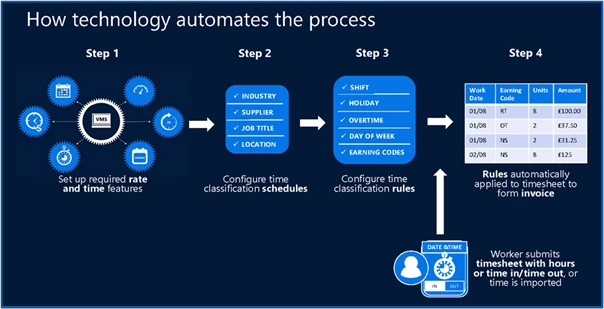
Your contingent workers simply enter their time, and your rules are automatically applied by Beeline RTE to produce a final invoice for your client.
Persona
Client Administrators and program office users.
Action required
Setting up Beeline RTE requires planning on your part, a Make a Change ticket and Beeline Enterprise configuration. Here are quick steps outlining what’s involved.
- You and your MSP work together to gather and outline your rate requirements and rules, and then share them with Beeline. se this Beeline RTE Intake Questionnaire to help you and your MSP gather the information you need before you meet with your COM to configure Beeline RTE.
- Your Beeline Customer Success team sets up the Beeline RTE features your organization wants to use.
- Initially, your Beeline Customer Success team sets up Time Classifications.
- Your Client Operations Manager (COM) must set up each user with the appropriate visibility and access to manage time classifications.
- After the initial setup, your program office can administer and manage Time Classifications via Self-Service.
- Your contingent worker submits their timesheet.
- Classification rules are automatically applied to the submitted timesheet and an invoice is produced.
Beeline RTE is a component of the Contingent Staffing and Services Procurement modules available with Enterprise.
Resources
- For a quick overview of Beeline RTE, check out this Introducing the Beeline RTE Solution video.
Related articles
Documentation release: Beeline Enterprise | Q4 2023