


Beeline Enterprise incorporates a variety of specialized dashboards to help you manage your data and system reporting better. One of these is the Reporting Manager. By using this dashboard, you'll have easy access to monitor Usage statistics, verify Access rights by user role, and review report Scheduling timelines.
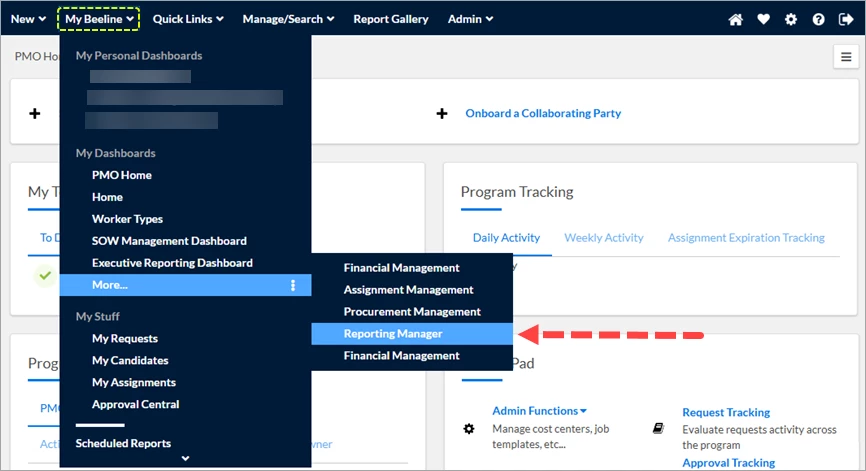
Navigation Path: My Beeline > My Dashboards > More… > Reporting Manager
Reporting Manager Dashboard Reports
| • About to Expire Reports | • Reports with Favorite Reports |
| • Favorite Reports Lookup | • Request Field Library |
| • Manager Report Access | • Scheduled Report Errors - Internal |
| • Manager Report Count Greater Than 25 | • Scheduled Reports Lookup |
| • Manager Report List | • Supplier Report Access |
| • My Personal Dashboard Available Reports | • Supplier Report Count Greater Than 12 |
| • My Personal Dashboard Internal Report | • Supplier Report List |
| • Recently Expired Reports | • Top 20 Client Ran Reports |
| • Recently Run Reports | • Top 20 MSP Ran Reports |
| • Report Count Risks | • Top 20 Supplier Ran Reports |
| • Report Usage Lookup |
Usage (Defaults to this screen)
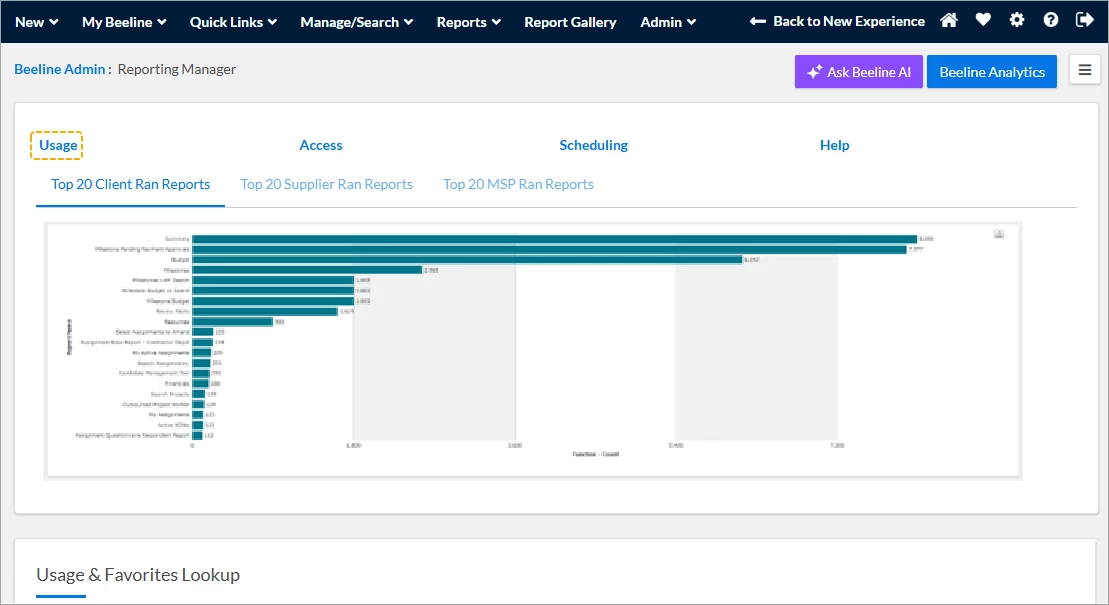
Top of the dashboard
- Top 20 Client Ran Reports - Provides usage for the top 20 reports used by client roles such as Beeline standard Hiring Managers within the last 30 days including dashboard reports.
- Top 20 Supplier Ran Reports - Provides usage for the top 20 reports used by Beeline standard supplier roles such as Supplier/Supplier Admin within the last 30 days including dashboard reports.
- Top 20 MSP/VMO Ran Reports - Provides usage for the top 20 reports used by the PMO roles such as MSP/VMO and VMO Admin/MSP Admin, within the last 30 days including dashboard reports.
Bottom/Footer for dashboard
- Report Usage Lookup - Provides usage of reports run (from most recent), who ran the report with additional content, who it was run by, role of user, report type and if it was run from a Favorite. The users can search for a specific report name, category, role type, and date range.
- Favorite Reports Lookup - Provides a list of Favorite reports and the report they were created from as well as who ran it as well as the username and if they are active in the tool. The users can search for a specific report name and what report it was created from.
Access
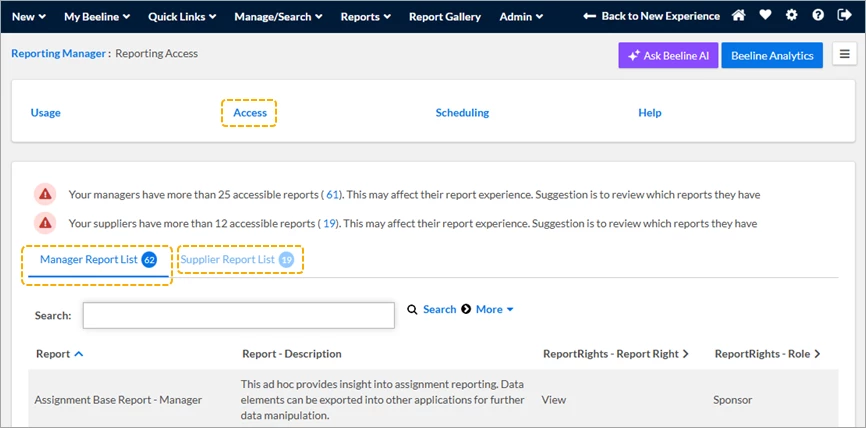
- Manager Report Count Greater Than (_) - This report will tell you how many reports the managers have access to. The users can drill into the number and see the Report Category, Name, and description (if applicable). This list can be exported to Excel to review the content outside of Beeline.
- Supplier Report Count Greater Than (_) - This report will tell you how many reports the Suppliers have access to. The users can drill into the number and see the Report Category, Name, and description (if applicable). This list can be exported to Excel to review the content outside of Beeline.
Top of the dashboard
- Manager Report List - Provides the available reports available to the Hiring Manager role. There is a brief description of the report as well as the access (Report Rights) the Hiring Manager role has. This report has a search option to search for specific reports.
- Supplier Report List - Provides the available reports available to the Supplier role. There is a brief description of the report as well as the access (Report Rights) the Supplier role has. This report has a search option to search for specific reports.
Scheduling
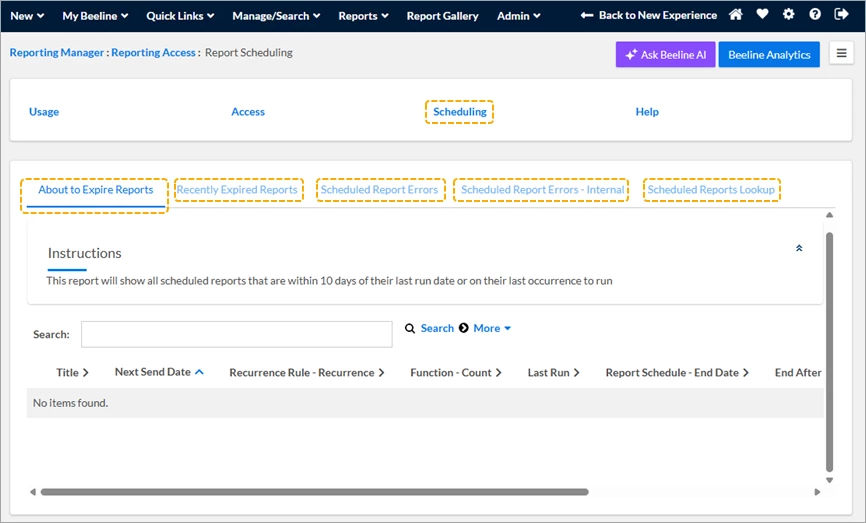
Top of the dashboard
- About to Expire Reports - Scheduled Reports that will expire soon with username and next run date. Users can search for a specific report name and export the data to Excel.
- Recently Expired Reports - Reports that have recently expired Scheduled Reports with Run Count as well as end date. Action dropdown can allow the user to view the Scheduled Details.
- Scheduled Report Errors Error message as well as run date and user who scheduled it. Action dropdown can allow the user to view the Scheduled Details.
- Scheduled Reports Lookup Multi-search lookup of scheduled reports that have run. Users can see who the report was scheduled to as well as when the next send date. Action dropdown can allow the user to view the Scheduled Details.
| Persona | Module | Date Updated | Feedback? Email us: |
| Report Users | Beeline | Beeline Enterprise |