Occasionally, you may need to cancel a miscellaneous fee before it is invoiced or processed. For example, a fee might contain an incorrect amount, be assigned to the wrong payor, include an incorrect purchase order number, or no longer be needed.
Cancel a fee to prevent it from continuing through the approval, invoicing, and payment process.
Incorrect or outdated fees can affect financial records, reporting accuracy, and downstream invoicing activities. Understanding when and how to cancel a fee helps maintain accurate assignment-related data and supports reliable financial oversight.
Cancelling fees helps you:
Maintain accurate assignment-related financial records.
Support reporting and audit requirements.
Ensure fee information reflects current business needs.
Avoid confusion caused by fees that are no longer valid.
Maintain confidence in assignment-related cost data.
Who it's for
Program Office users
Financial operations teams
Users authorized to manage miscellaneous fees
Users responsible for maintaining assignment financial records
How it helps
Fee cancellation provides a way to prevent a fee from continuing through the normal processing lifecycle when it should no longer be used. Using fee cancellation, you can:
Stop a fee before it reaches invoicing.
Remove incorrect or unnecessary fees from processing.
Prevent outdated fees from moving through approval workflows.
Manage individual recurring fee occurrences when needed.
Correct fee-entry mistakes without creating additional processing activity.
Availability and setup
The ability to cancel miscellaneous fees depends on your organization's configuration and user permissions.
If you do not see the option to cancel a fee, contact your Program Office administrator, Client Operations Manager (COM), or internal support team.
Understand fee cancellation
When you cancel a fee, it stops moving through the normal processing lifecycle and is updated to Canceled status.
After cancellation:
The fee is no longer eligible for processing or invoicing.
Historical information remains available for auditing and research.
Approval and workflow history associated with the fee is retained.
Important behavior
You can cancel a fee in most statuses before it reaches Processed status.
Fees in Processed status cannot be canceled.
Canceling a fee changes its status to Canceled.
Canceling a fee does not remove historical records associated with the fee.
Canceling a recurring fee occurrence does not cancel the entire recurring schedule.
If an assignment ends before its original end date, future recurring fee occurrences outside the revised assignment dates may be automatically canceled.
What this means
Before canceling a fee, review its status and confirm that the fee should not continue through processing.
For example:
If a fee was entered incorrectly and has not been processed, cancel the fee and create a replacement fee if needed.
If a recurring fee occurrence is no longer required, cancel the occurrence without affecting the remaining schedule.
If a fee has already reached Processed status, investigate available correction options because cancellation is no longer available.
Before you begin
Ensure:
You have permission to manage miscellaneous fees.
The fee has not reached Processed status.
You have confirmed that the fee should no longer continue through processing.
You understand whether the fee is a one-time fee or part of a recurring schedule.
How to cancel a fee
Information in this article reflects a standard Enterprise configuration. Your Enterprise platform is based on your organization’s configuration. Settings and/or data visibility rules may vary slightly from what is described.
To accomplish your task, complete these steps from your Enterprise dashboard.
From the Simple Search option, enter an assignment ID or a resource name for the assignment that contains the fee you want to cancel. An Assignment page displays.
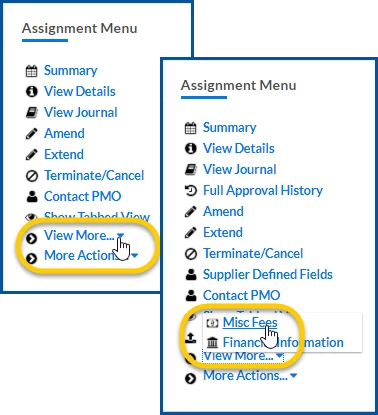
From the Assignment Menu, select View More > Misc Fee. An Assignment Edit - Misc Fee page displays.
In the Generated Misc Fees section, locate the fee you want to cancel.
Verify that the fee is not in Processed status. ⚠️
What this does: Confirms the fee is eligible for cancellation.
Why this matters: Processed fees have already been processed and cannot be canceled.
In simple terms: Make sure it's not too late to cancel the fee
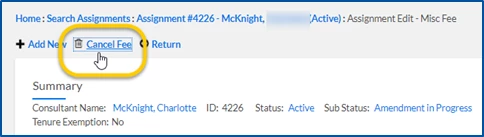
Select Cancel Fee. A confirmation message displays.
Select OK to confirm the cancellation. The fee status is updated to Canceled.
Final result
The fee is canceled and removed from the normal processing lifecycle. The fee remains available for historical review, auditing, and reporting purposes, but it will no longer proceed through approval, invoicing, or payment processing.
Key takeaway
Canceling a fee prevents it from continuing through processing and invoicing. Always verify the fee status before canceling, and remember that canceling a single occurrence of a recurring fee does not cancel the entire recurring schedule.
Frequently asked questions (FAQs)
When should I cancel a fee?
Cancel a fee when it was entered incorrectly, is no longer needed, or should not continue through the approval and invoicing process.
Can I cancel a Processed fee?
No. Fees in Processed status cannot be canceled.
What happens when I cancel a fee?
The fee status changes to Canceled, and the fee no longer continues through processing.
Does canceling a fee delete it?
No. The fee remains available for reporting, auditing, and historical review.
Can I cancel an entire recurring schedule by canceling one occurrence?
No. Canceling an individual recurring fee occurrence does not cancel the remaining occurrences in the recurring schedule.
Why don't I see the Cancel Fee option?
The fee may be in a status that does not support cancellation, or your permissions may not allow fee management.
Can I view information about a canceled fee later?
Yes. Historical fee information remains available after cancellation.
What should I do if I canceled the wrong fee?
Create a new fee if a replacement is required and follow your organization's procedures for correcting fee-entry errors.
Please complete the following fields as part of your Beeline Community registration. Unless noted as private, this information will be displayed on your user profile within the community.