


Understand validation issues and take action faster
Actionable Error Insights helps you review and resolve validation issues more efficiently during the import process. When validation identifies an error or warning, you can access additional context, understand why the issue occurred, and review recommended corrective actions directly from the import results page.
By bringing validation details and resolution guidance into your workflow, Actionable Error Insights helps you make informed updates, revalidate your data, and complete imports with fewer interruptions.
Jump to what you want
Why it matters
- Spend less time investigating validation issues.
- Resolve validation issues more efficiently.
- Reduce trial-and-error validation cycles.
- Make informed corrections with greater confidence.
- Complete imports with fewer validation-related delays.
Who it's for
- Program Office Managers
- Data Administrators
- System Integrators
- Beeline Implementation Consultants
Availability and setup
- Actionable Error Insights is available for Cost Center, Assignment, and Timesheet import templates.
- You must have access to VMS Settings to access the Web Import Tool and supported import templates.
How it helps
- Displays validation details directly from the import results page.
- Provides clear, human-readable explanations for validation errors and warnings.
- Displays additional context about validation issues.
- Recommends actions to help resolve validation issues.
- Identifies related records that may require similar corrections.
How it works
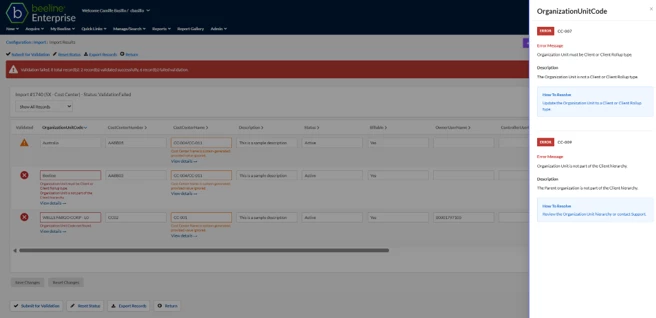
- Validation results are displayed directly in the import results page.
- Validation statuses help you quickly identify records that require attention.
- Issues and warnings include a View details link.
- Selecting View details opens the Actionable Error Insights panel.
- The panel provides additional context about the validation issue, recommended corrective actions, and related records that may require attention.
- After you update data and revalidate the import, validation results are refreshed to reflect the latest validation status.
Understand validation statuses
| Status | What it means |
|---|---|
| Error | The record contains a validation issue that must be resolved before the import can be completed. |
| Warning | The record contains a validation issue that should be reviewed. |
| Pending | The record has been updated and is awaiting revalidation. |
| Updated | An existing record will be updated when the import is completed. |
| Added | A new record will be created when the import is completed. |
Before you begin
Use Actionable Error Insights when you need to:
- Understand why a validation error or warning occurred.
- Identify the field associated with a validation issue.
- Review recommended corrective actions.
- Find related validation issues that may require similar updates.
Review validation issue details
Information in this article reflects a standard Enterprise configuration. Your Enterprise platform is based on your organization’s configuration. Settings and/or data visibility rules may vary slightly from what is described.
To accomplish your task, complete these steps from your Enterprise dashboard.
-
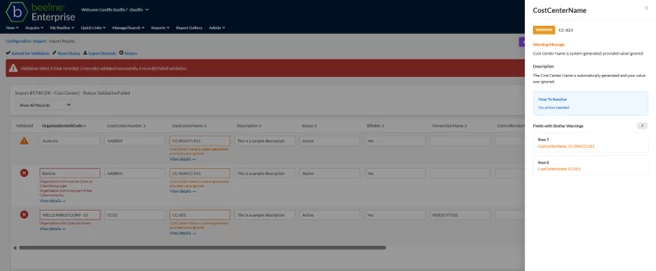
From the import results page, select View details for a validation error or warning.
What this does: Opens the Actionable Error Insights panel for the selected validation issue.
Why this matters: You can review additional information about the validation issue and determine how to resolve it.
-
Review the validation details, recommended resolution guidance, and any related fields.
What this does: Displays additional context about the selected validation issue.
Why this matters: The details help you understand the issue, identify related records that may require attention, and determine the appropriate corrective action.
The panel may include the following information:
Information Description Severity Indicates whether the validation item is an issue or warning. Message Explains the validation issue. Description Provides additional context about the issue. How to Resolve Recommends actions to help resolve the issue. Related Fields Identifies related records or fields that may require similar corrections. -
Update the affected data and revalidate the import.
What this does: Runs validation against the updated data.
Why this matters: Revalidation confirms whether the issue has been resolved.
System feedback: Validation results are refreshed, and affected records display updated validation statuses based on the latest validation results.
Learn more
| Persona Program office users | Modules Contingent Staffing Services Procurement | Documentation release Beeline Enterprise | Q4 2026 | Feedback? Email us: |